Templates · Home screens · Social app · Squawk
Squawk Home screen
A home screen from Squawk, a short posts and live conversation app template in a Minimal style. Screen 5 of 25.
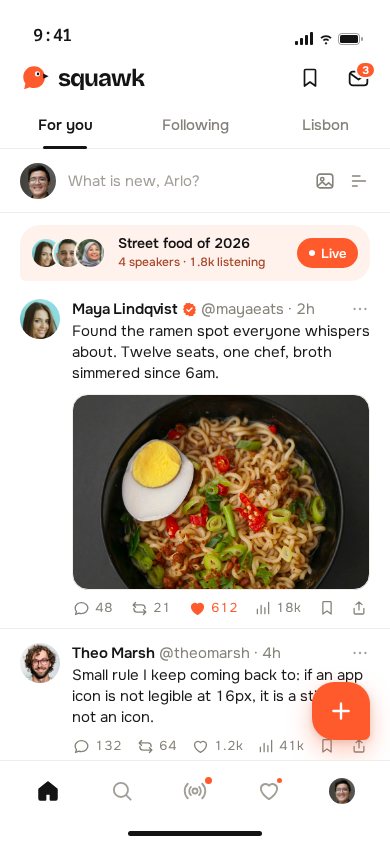
Squawk is a complete short post social app: welcome, topic picks, sign in and a code check, a For you feed with a live room strip, a post with its replies, compose with a photo and a keyboard, a full screen photo, explore with trends, search results, a trending topic with a poll, live rooms and a room with speakers, captions and listeners, messages and a chat, activity, your profile and someone else's, followers, saved folders, insights, a Plus plan with checkout and confirmation, and settings. White and warm stone with ink and one vermillion accent.
| Detail | Value |
|---|---|
| Screen type | Home |
| App | Squawk: Short posts and live conversation |
| Category | Social |
| Design language | Minimal, light |
| Type | Bricolage Grotesque for headings, Onest for text |
| Colours | #ffffff background, #f5f4f0 surface, #141414 text, #85827a text-muted, #ff5a2c accent, #ffffff accent-contrast, #fff1eb secondary, #efeee9 border, #e2461b danger |
What this screen says
- squawk
- For you
- Following
- Lisbon
- What is new, Arlo?
- Street food of 20264 speakers · 1.8k listening
- Live
- Maya Lindqvist @mayaeats · 2h
- Found the ramen spot everyone whispers about. Twelve seats, one chef, broth simmered since 6am.
- 48 21 612 18k
- Theo Marsh@theomarsh · 4h
- Small rule I keep coming back to: if an app icon is not legible at 16px, it is a sticker, not an icon.
- 132 64 1.2k 41k
- Nur Aziz@nurwalks · 5h
- Sunday walk up the old tram hill. 9.4 km, 3 pastries.
- 12 8 240 6k
Around it in Squawk
More home screens
- Hearth Chats: Messenger for trips and circles
- Chirp Chats: Messenger with file sharing
- Banter Chats: Live messenger
- Natter Chats: Minimal messenger
- Nearly Home: Dating by crossed paths
- Linkup Home: Professional network and jobs
- Quorum Home: Questions and expert answers
- Backer Home: Support creators with memberships
- Pledge Discover: Back creative projects
- Civic Home: Report issues and city services
- Guild Home: Community servers with voice and text chat
- Parrot Chats: Private messaging, groups and calls
What makes a good home screen
- Put the most important thing first. Decide the one thing most people come for, like today's workout, a balance or the next booking, and give it the top of the screen.
- Make it feel current. Greetings with the time of day, today's date, fresh numbers and recent activity tell people the app is alive and about them.
- Keep quick actions within thumb reach. The two or three things people do most should be one tap away, in the lower part of the screen or a floating button.
- Group related content in clear sections. Use headings and spacing so the screen scans as a few blocks, not a long mixed list.
The full home screen guide and every example
Remix Squawk free: describe your own app and it is drawn in this design. Or get its files from $10: Figma, React Native, SwiftUI, Flutter and HTML.