Templates · Home screens · Travel app · Museo
Museo Today screen
A home screen from Museo, a museum guide app template in a Brutalist style. Screen 5 of 25.
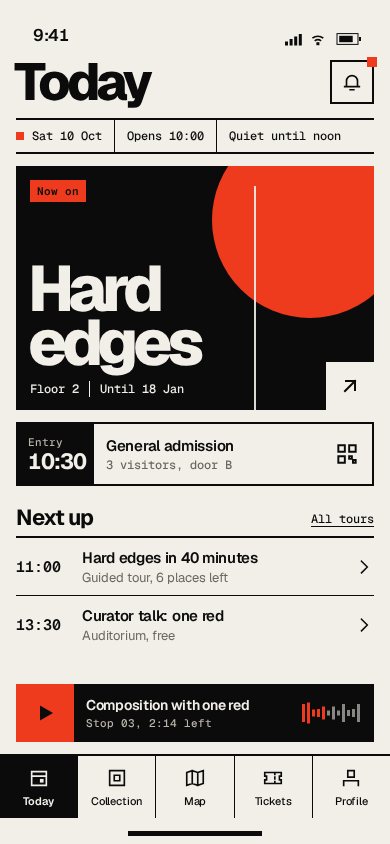
Museo is a complete museum guide: welcome, sign in, create account and a code, today at the museum, notifications, exhibitions and one in full, an artwork page, an audio guide player, a floor map with a route to a gallery, tours and booking, timed tickets with checkout and a ticket to scan, collection search, favourites, a record of your visits, membership, profile and settings. Everything sits on a ruled grid in black on paper, with vermilion kept for what is live, selected or yours.
| Detail | Value |
|---|---|
| Screen type | Home |
| App | Museo: Museum guide |
| Category | Travel |
| Design language | Brutalist, light |
| Type | Geist |
| Colours | #f1efe8 background, #faf9f5 surface, #0b0b0b text, #6b6860 text-muted, #ef3b1d accent, #0b0b0b accent-contrast, #d5d1c5 secondary, #0b0b0b border, #c22a10 danger |
What this screen says
- Today
- Sat 10 Oct Opens 10:00 Quiet until noon
- Now on
- Hard
- edges
- Floor 2 Until 18 Jan
- Entry10:30
- General admission3 visitors, door B
- Next upAll tours
- Hard edges in 40 minutesGuided tour, 6 places left
- Curator talk: one redAuditorium, free
- Composition with one redStop 03, 2:14 left
- Collection
- Map
- Tickets
- Profile
Around it in Museo
More home screens
- Caravan Home: Campervan rental and road trips
- Layover Home: Airport guide, gates and lounges
- Permit Wallet: Visas and travel documents wallet
- Backroad Home: Road trip planner with stops
- Bunk Home: Hostels and backpacker meetups
- Piazza Today: Self-guided city walking tours
- Fjord Today: Cruise companion on board
- Atlas Map: Maps and navigation
- Kerb Map: Parking that reads like a road sign
- Linea Home: City transit
- Hollow Explore: Cabin and boutique stays
- Aloft Home: Flight tracker
What makes a good home screen
- Put the most important thing first. Decide the one thing most people come for, like today's workout, a balance or the next booking, and give it the top of the screen.
- Make it feel current. Greetings with the time of day, today's date, fresh numbers and recent activity tell people the app is alive and about them.
- Keep quick actions within thumb reach. The two or three things people do most should be one tap away, in the lower part of the screen or a floating button.
- Group related content in clear sections. Use headings and spacing so the screen scans as a few blocks, not a long mixed list.
The full home screen guide and every example
Remix Museo free: describe your own app and it is drawn in this design. Or get its files from $10: Figma, React Native, SwiftUI, Flutter and HTML.