Templates · Home screens · Travel app · Hollow
Hollow Explore screen
A home screen from Hollow, a cabin and boutique stays app template in a Luxury style. Screen 4 of 25.
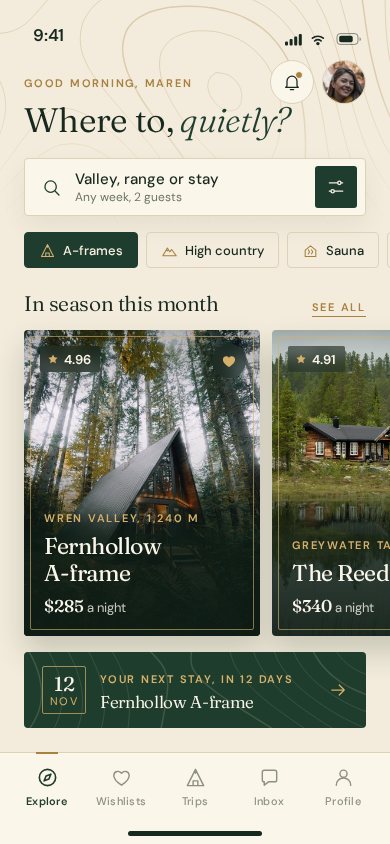
Hollow is a complete stays app: welcome, sign in and a code, an explore home with tall cabin cards, search, results, a contour map with price pins, a stay page, reviews, dates, guests, checkout and a booked screen, trips and a trip with arrival details, a host guidebook and a trail with its elevation profile, inbox and host chat, wishlists, a nights away dashboard, a membership, notifications, profile and settings. Forest green, cream and one brass throughout.
| Detail | Value |
|---|---|
| Screen type | Home |
| App | Hollow: Cabin and boutique stays |
| Category | Travel |
| Design language | Luxury, light |
| Type | DM Sans |
| Colours | #f3ecdc background, #fbf6ea surface, #17281f text, #6d7566 text-muted, #1f3d2e accent, #f6efdf accent-contrast, #a8813f secondary, #ddd2b8 border, #a4442e danger |
What this screen says
- Good morning, Maren
- Where to, quietly?
- Valley, range or stay
- Any week, 2 guests
- A-frames High country Sauna Off-grid
- In season this month
- See all
- Wren Valley, 1,240 m
- Fernhollow A-frame
- $285 a night
- Greywater Tarn, 980 m
- The Reed House
- $340 a night
- 12Nov
- Your next stay, in 12 days
- Explore
- Wishlists
- Trips
- Inbox
- Profile
Around it in Hollow
More home screens
- Kerb Map: Parking that reads like a road sign
- Linea Home: City transit
- Aloft Home: Flight tracker
- Pitch Home: Campsite booking and trip kit
- Hail Home: Ride hailing
- Volta Home: EV charging
- Museo Today: Museum guide
- Roamly Home: Trips, stays and experiences
- Jaunt Home: Bus, train and flight booking
- Spoke Home: Bike sharing
- Navara Home: Yacht charter
- Voya Home: Travel booking
What makes a good home screen
- Put the most important thing first. Decide the one thing most people come for, like today's workout, a balance or the next booking, and give it the top of the screen.
- Make it feel current. Greetings with the time of day, today's date, fresh numbers and recent activity tell people the app is alive and about them.
- Keep quick actions within thumb reach. The two or three things people do most should be one tap away, in the lower part of the screen or a floating button.
- Group related content in clear sections. Use headings and spacing so the screen scans as a few blocks, not a long mixed list.
The full home screen guide and every example
Remix Hollow free: describe your own app and it is drawn in this design. Or get its files from $10: Figma, React Native, SwiftUI, Flutter and HTML.