Templates · Search and explore screens · Productivity app · Inkline
Inkline Search screen
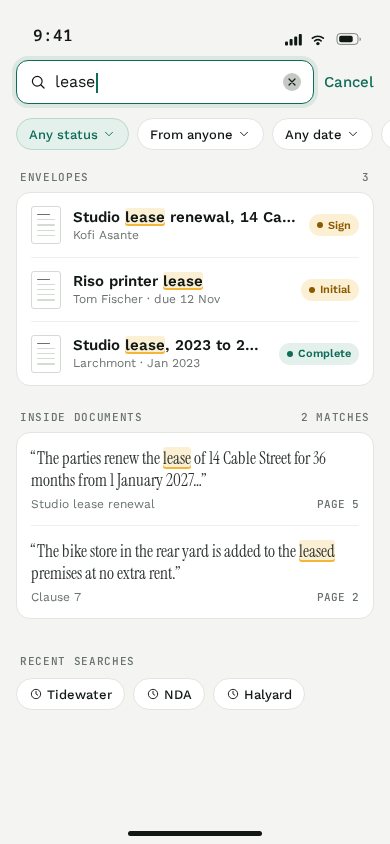
A search screen from Inkline, a sign and send contracts app template in a Clinical style. Screen 19 of 25.
Inkline is a complete contract signing app: welcome, sign in, adopting a signature, a home with what needs your signature, an inbox of envelopes, an envelope with its signer chain, a document viewer with sign here flags, a signature pad, finish and signed, then sending your own: upload, recipients and signing order, placing fields on the page, review and sent, live status as a signer reads, the audit trail certificate, templates, search, contacts, turnaround insights, plans, notifications, profile and settings. Paper white and hairlines with deep viridian ink and amber flags.
| Detail | Value |
|---|---|
| Screen type | Search |
| App | Inkline: Sign and send contracts |
| Category | Productivity |
| Design language | Clinical, light |
| Type | Instrument Serif for headings, Work Sans for text |
| Colours | #f4f5f2 background, #ffffff surface, #111714 text, #69726d text-muted, #0d6b57 accent, #e3f0eb accent-soft, #f5b638 secondary, #e2e5e0 border, #b23a2e danger |
What this screen says
- lease
- Cancel
- Any status From anyone Any date Has my signature
- Envelopes 3
- Studio lease renewal, 14 Cable St
- Kofi Asante
- Sign
- Riso printer lease
- Tom Fischer · due 12 Nov
- Initial
- Studio lease, 2023 to 2026
- Larchmont · Jan 2023
- Complete
- Inside documents 2 matches
- “The parties renew the lease of 14 Cable Street for 36 months from 1 January 2027…”
- Studio lease renewal PAGE 5
- “The bike store in the rear yard is added to the leased premises at no extra rent.”
- Clause 7 PAGE 2
- Recent searches
- Tidewater NDA Halyard
Around it in Inkline
More search and explore screens
- Sheet Filter: Spreadsheets and databases
- Tunnel Map: VPN and online privacy
- Ping Servers: Internet speed test
- Glance Results: Visual search with the camera
- Replay Search: Record and share screen videos
- Easel Search: Collaborative whiteboard
- Token Search: Two-factor codes and sign-in approvals
- Beam Search: Send big files
- Parchment Search: Documents, edit and share
- Lectern Search: Slides and presenter remote
- Ringer Search: Phone, contacts and voicemail
- Pipeline Search: Sales CRM on the road
Every productivity app search screen
What makes a good search screen
- Show something before people type. Recent searches, popular items or categories make the empty search screen useful and save typing.
- Suggest as people type. Autocomplete with matching items, not only matching words, lets people jump straight to a result.
- Make filters visible and reversible. Show active filters as chips that can be removed in one tap, and the number of results as filters change.
- Forgive typos. Close matches and "Did you mean" stop a spelling mistake from ending in an empty screen.
The full search screen guide and every example
Remix Inkline free: describe your own app and it is drawn in this design. Or get its files from $10: Figma, React Native, SwiftUI, Flutter and HTML.