Templates · Home screens · Travel app · Voya
Voya Home screen
A home screen from Voya, a travel booking app template in a Playful style. Screen 4 of 15.
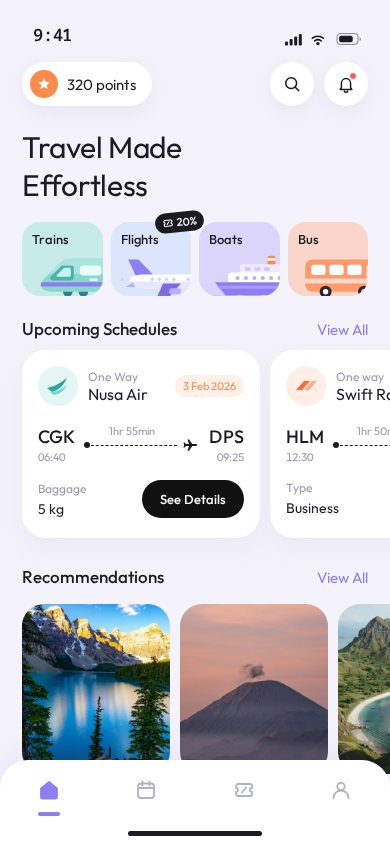
Voya is one app for trains, flights, boats and buses: onboarding, sign in, a home with upcoming schedules, trip search, results, seat selection, checkout, a boarding pass, offers, a membership paywall, profile and settings. Soft lavender and mint on near-white, with hand-drawn vehicle illustrations and black pill buttons.
| Detail | Value |
|---|---|
| Screen type | Home |
| App | Voya: Travel booking |
| Category | Travel |
| Design language | Playful, light |
| Type | Outfit |
| Colours | #f4f3fb background, #ffffff surface, #1c1b22 text, #8b8a99 text-muted, #8f7df2 accent, #ffffff accent-contrast, #a8dfd9 secondary, #ecebf5 border, #ff8a4c warning |
What this screen says
- 320 points
- Travel Made
- Effortless
- Trains
- Flights
- Boats
- Bus
- Upcoming SchedulesView All
- One Way
- Nusa Air
- 3 Feb 2026
- CGK
- 1hr 55min
- DPS
- Baggage
- 5 kg
- See Details
- Swift Rail
- HLM
- 1hr 50min
- PDL
- Type
- Business
- RecommendationsView All
Around it in Voya
More home screens
- Fjord Today: Cruise companion on board
- Atlas Map: Maps and navigation
- Kerb Map: Parking that reads like a road sign
- Linea Home: City transit
- Hollow Explore: Cabin and boutique stays
- Aloft Home: Flight tracker
- Pitch Home: Campsite booking and trip kit
- Hail Home: Ride hailing
- Volta Home: EV charging
- Museo Today: Museum guide
- Roamly Home: Trips, stays and experiences
- Jaunt Home: Bus, train and flight booking
What makes a good home screen
- Put the most important thing first. Decide the one thing most people come for, like today's workout, a balance or the next booking, and give it the top of the screen.
- Make it feel current. Greetings with the time of day, today's date, fresh numbers and recent activity tell people the app is alive and about them.
- Keep quick actions within thumb reach. The two or three things people do most should be one tap away, in the lower part of the screen or a floating button.
- Group related content in clear sections. Use headings and spacing so the screen scans as a few blocks, not a long mixed list.
The full home screen guide and every example
Remix Voya free: describe your own app and it is drawn in this design. Or get its files from $10: Figma, React Native, SwiftUI, Flutter and HTML.