Templates · Form and input screens · Travel app · Layover
Layover Add flight screen
A form screen from Layover, a travel app template in an Enterprise style. Screen 3 of 25.
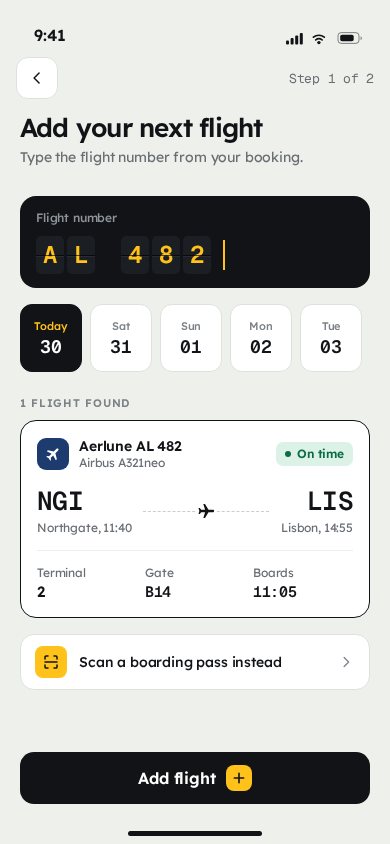
Layover is a complete airport companion: welcome, sign in, add a flight, a home with the next flight, a boarding countdown and live wayfinding signs, flight details, a boarding pass, a split flap departures board, a terminal map with a walking route, security wait times, a tight connection guide, explore and search, lounges with booking and a lounge pass, a coffee bar with order ahead and live pickup status, airport services, a year of trips in charts, alerts, a paid plan, profile and settings. Concrete grey and white with ink and signal yellow.
| Detail | Value |
|---|---|
| Screen type | Form |
| App | Layover: Airport guide, gates and lounges |
| Category | Travel |
| Design language | Enterprise, light |
| Type | Geist Mono for headings, Lexend for text |
| Colours | #eef0eb background, #ffffff surface, #111316 text, #686e74 text-muted, #ffc21a accent, #111316 accent-contrast, #12845a secondary, #dfe2dc border, #d63c3c danger |
What this screen says
- Step 1 of 2
- Add your next flight
- Type the flight number from your booking.
- Flight number
- AL 482
- Today 30
- Sat 31
- Sun 01
- Mon 02
- Tue 03
- 1 flight found
- Aerlune AL 482Airbus A321neo
- On time
- NGINorthgate, 11:40
- LISLisbon, 14:55
- Terminal2
- GateB14
- Boards11:05
- Scan a boarding pass instead
- Add flight
Around it in Layover
More form and input screens
- Berth Extras: Night trains and sleeper cabins
- Caravan Pickup: Campervan rental and road trips
- Permit Apply for e-visa: Visas and travel documents wallet
- Backroad Add stop: Road trip planner with stops
- Bunk Host a meetup: Hostels and backpacker meetups
- Piazza Rate walk: Self-guided city walking tours
- Fjord Reserve table: Cruise companion on board
- Atlas Add a review: Maps and navigation
- Hollow Guests: Cabin and boutique stays
- Aloft Check in: Flight tracker
- Hail Set pickup: Ride hailing
- Volta Filters: EV charging
What makes a good form screen
- Ask only what you need. Every field is a reason to stop. Remove optional fields or move them to later.
- Labels above fields. Visible labels stay readable while people type; placeholder-only labels disappear.
- Use the right keyboard and input. Number pads for amounts, email keyboards for email, pickers for dates and autofill for addresses and codes.
- Validate as people go. Show problems next to the field when people leave it, in words that say how to fix them.
The full form screen guide and every example
Remix Layover free: describe your own app and it is drawn in this design. Or get its files from $10: Figma, React Native, SwiftUI, Flutter and HTML.