Templates · Home screens · Travel app · Wheelhouse
Wheelhouse Home screen
A home screen from Wheelhouse, a driver app for ride hailing app template in a Dark-first style. Screen 3 of 25.
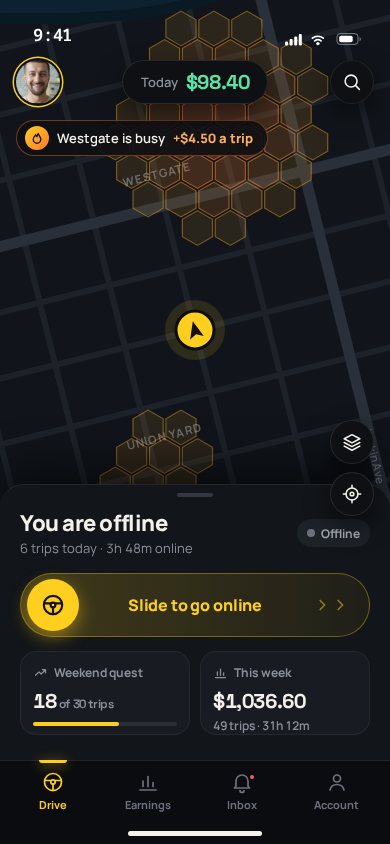
Wheelhouse is a complete ride hailing driver app: welcome and sign in, a home map with a slide to go online, the online state with a demand heat grid, an incoming trip request with fare and countdown, turn by turn navigation to the pickup, waiting at the pickup, rider messages, the trip in progress, trip complete and rating the rider, earnings by week and by day, a trip receipt, instant cash out, the demand map, a destination filter, promotions, a Pro plan, documents, the vehicle, notifications, profile and settings. Blue black asphalt with road marking yellow and mint.
| Detail | Value |
|---|---|
| Screen type | Home |
| App | Wheelhouse: Driver app for ride hailing |
| Category | Travel |
| Design language | Dark-first, dark |
| Type | Space Grotesk for headings, Manrope for text |
| Colours | #0b0d11 background, #15181e surface, #f3f1ea text, #8b919c text-muted, #ffcf1f accent, #14110a accent-contrast, #5ce1a6 secondary, #262a32 border, #ff5a5f danger |
What this screen says
- Today $98.40
- Westgate is busy +$4.50 a trip
- You are offline
- 6 trips today · 3h 48m online
- Offline
- Slide to go online
- Weekend quest 18 of 30 trips
- This week $1,036.6049 trips · 31h 12m
- Drive
- Earnings
- Inbox
- Account
Around it in Wheelhouse
More home screens
- Permit Wallet: Visas and travel documents wallet
- Backroad Home: Road trip planner with stops
- Bunk Home: Hostels and backpacker meetups
- Piazza Today: Self-guided city walking tours
- Fjord Today: Cruise companion on board
- Atlas Map: Maps and navigation
- Kerb Map: Parking that reads like a road sign
- Linea Home: City transit
- Hollow Explore: Cabin and boutique stays
- Aloft Home: Flight tracker
- Pitch Home: Campsite booking and trip kit
- Hail Home: Ride hailing
What makes a good home screen
- Put the most important thing first. Decide the one thing most people come for, like today's workout, a balance or the next booking, and give it the top of the screen.
- Make it feel current. Greetings with the time of day, today's date, fresh numbers and recent activity tell people the app is alive and about them.
- Keep quick actions within thumb reach. The two or three things people do most should be one tap away, in the lower part of the screen or a floating button.
- Group related content in clear sections. Use headings and spacing so the screen scans as a few blocks, not a long mixed list.
The full home screen guide and every example
Remix Wheelhouse free: describe your own app and it is drawn in this design. Or get its files from $10: Figma, React Native, SwiftUI, Flutter and HTML.