Templates · Settings screens · Food app · Ladle
Ladle Settings screen
A settings screen from Ladle, a recipes and meal planning app template in a Minimal style. Screen 25 of 25.
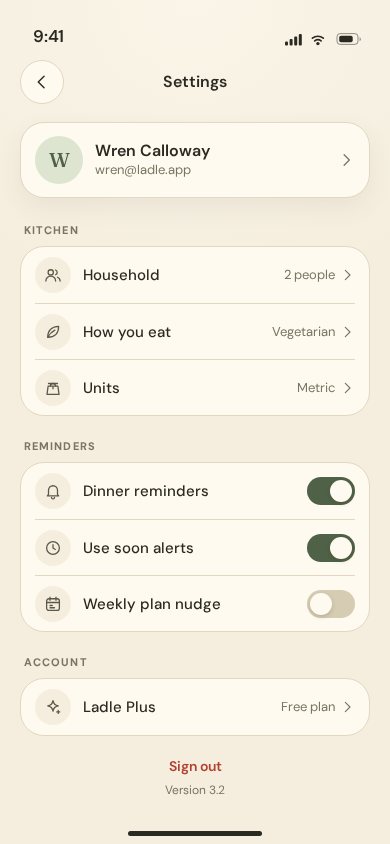
Ladle is a complete recipe and meal planning app: onboarding and taste picks, sign in, a home with tonight's dinner, search, a recipe with scalable ingredients, a step by step cook mode with timers, a week planner, one shopping list sorted by aisle, a pantry with use it up ideas, collections, nutrition, a recipe editor, a plan, notifications, profile and settings. Cream, sage and terracotta with arch and circle photo crops.
| Detail | Value |
|---|---|
| Screen type | Settings |
| App | Ladle: Recipes and meal planning |
| Category | Food |
| Design language | Minimal, light |
| Type | DM Sans |
| Colours | #f5eedf background, #fffaf0 surface, #2b2a22 text, #857f6c text-muted, #4f6146 accent, #fffaf0 accent-contrast, #c4623c secondary, #e2d7c0 border, #b3402e danger |
What this screen says
- Settings
- Wren Calloway
- wren@ladle.app
- Kitchen
- Household
- 2 people
- How you eat
- Vegetarian
- Units
- Metric
- Reminders
- Dinner reminders
- Use soon alerts
- Weekly plan nudge
- Account
- Ladle Plus
- Free plan
- Sign out
- Version 3.2
Around it in Ladle
More settings screens
- Tiffin Settings: Food delivery
- Courier Settings: Food delivery driver app
- Picker Settings: Grocery shopper app
- Queue Settings: Join the waitlist from anywhere
- Nosh Settings: Local restaurant reviews
- Buns Settings: Burger chain ordering and deals
- Slice Settings: Pizza ordering with a live tracker
- Crate Settings: Meal kits delivered weekly
- Dash Settings: Ten minute grocery delivery
- Aisle Settings: Shared grocery lists
- Menu Settings: Scan, order and pay at the table
- Mart Settings: Supermarket app with loyalty and scan and go
Every food app settings screen
What makes a good settings screen
- Group options into clear sections. Account, notifications, privacy, appearance and help, with headings, so people scan to the right group.
- Label settings by their effect. "Daily reminder at 8:00" is clearer than "Reminders". Add a short description under options that need one.
- Use the right control. Toggles for on and off, a row that opens a list for choices, and sliders only for ranges.
- Apply changes immediately. Most mobile settings take effect when changed, with no Save button to forget.
The full settings screen guide and every example
Remix Ladle free: describe your own app and it is drawn in this design. Or get its files from $10: Figma, React Native, SwiftUI, Flutter and HTML.