Templates · Settings screens · Food app · Mart
Mart Settings screen
A settings screen from Mart, a food app template in an Enterprise style. Screen 25 of 25.
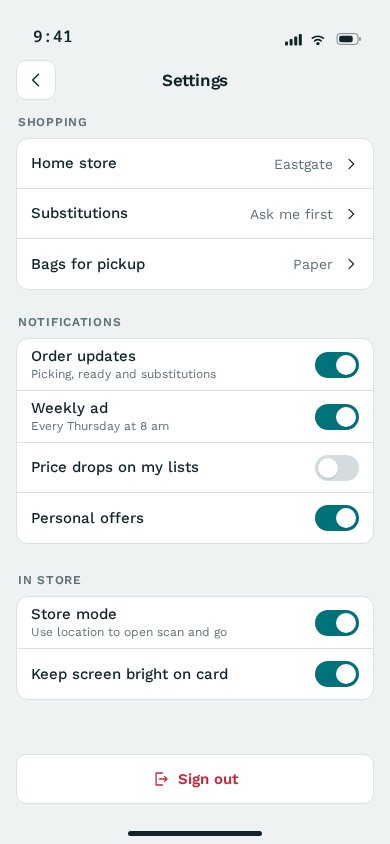
Mart is a complete supermarket app: welcome, home store, sign in, a home with points, store mode and clipped offers, the weekly ad, clip coupons, search, a product with aisle and unit price, a shopping list sorted by aisle, an in store aisle map, scan and go with a scanned basket and an exit pass, the loyalty card and points, cart, pickup slots, checkout, order placed and pickup status, receipts, a receipt, a membership plan, profile and settings. Cool grey and white with a deep teal, bright teal and shelf tag yellow.
| Detail | Value |
|---|---|
| Screen type | Settings |
| App | Mart: Supermarket app with loyalty and scan and go |
| Category | Food |
| Design language | Enterprise, light |
| Type | Oswald for headings, Work Sans for text |
| Colours | #eef2f3 background, #ffffff surface, #0f2329 text, #5f7177 text-muted, #00727a accent, #ffffff accent-contrast, #053f45 secondary, #ffd23f highlight, #dbe2e4 border, #c8263a danger |
What this screen says
- Settings
- Shopping
- Home store
- Eastgate
- Substitutions
- Ask me first
- Bags for pickup
- Paper
- Notifications
- Order updates
- Picking, ready and substitutions
- Weekly ad
- Every Thursday at 8 am
- Price drops on my lists
- Personal offers
- In store
- Store mode
- Use location to open scan and go
- Keep screen bright on card
- Sign out
Around it in Mart
More settings screens
- Crumb Settings: Neighbourhood bakery
- Tiffin Settings: Food delivery
- Courier Settings: Food delivery driver app
- Picker Settings: Grocery shopper app
- Queue Settings: Join the waitlist from anywhere
- Nosh Settings: Local restaurant reviews
- Buns Settings: Burger chain ordering and deals
- Slice Settings: Pizza ordering with a live tracker
- Crate Settings: Meal kits delivered weekly
- Dash Settings: Ten minute grocery delivery
- Aisle Settings: Shared grocery lists
- Menu Settings: Scan, order and pay at the table
Every food app settings screen
What makes a good settings screen
- Group options into clear sections. Account, notifications, privacy, appearance and help, with headings, so people scan to the right group.
- Label settings by their effect. "Daily reminder at 8:00" is clearer than "Reminders". Add a short description under options that need one.
- Use the right control. Toggles for on and off, a row that opens a list for choices, and sliders only for ranges.
- Apply changes immediately. Most mobile settings take effect when changed, with no Save button to forget.
The full settings screen guide and every example
Remix Mart free: describe your own app and it is drawn in this design. Or get its files from $10: Figma, React Native, SwiftUI, Flutter and HTML.