Templates · Settings screens · Food app · Nosh
Nosh Settings screen
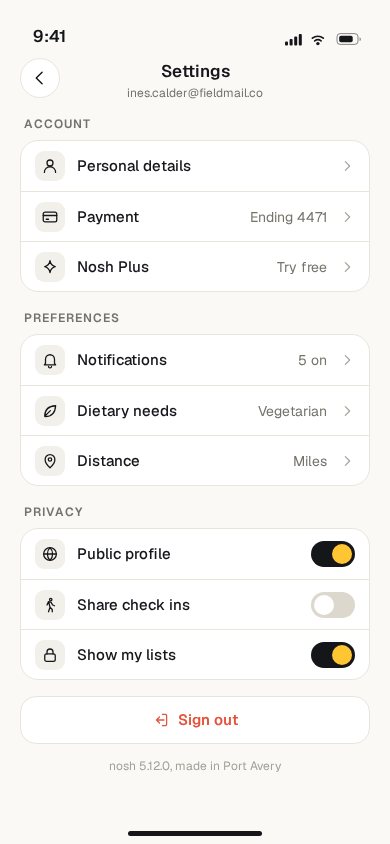
A settings screen from Nosh, a local restaurant reviews app template in a Minimal style. Screen 25 of 25.
Nosh is a complete local restaurant reviews app: welcome, taste picks, sign in, a home with nearby picks and categories, search, results with photo strips, a map with score pins, a restaurant page with booking slots, the menu, a photo viewer, reviews with a score histogram, a single review with the owner reply, writing a review, booking a table with confirmation and a ticket, a live waitlist, saved lists, a friends feed, a year in food, notifications, a Plus plan, profile and settings. Warm paper and white with ink and saffron.
| Detail | Value |
|---|---|
| Screen type | Settings |
| App | Nosh: Local restaurant reviews |
| Category | Food |
| Design language | Minimal, light |
| Type | Instrument Serif for headings, Geist for text |
| Colours | #faf9f6 background, #ffffff surface, #15161a text, #74726b text-muted, #ffc533 accent, #15161a accent-contrast, #fff3cf secondary, #e8e5dd border, #e5533a danger |
What this screen says
- Settingsines.calder@fieldmail.co
- Account
- Personal details
- Payment Ending 4471
- Nosh Plus Try free
- Preferences
- Notifications 5 on
- Dietary needs Vegetarian
- Distance Miles
- Privacy
- Public profile
- Share check ins
- Show my lists
- Sign out
- nosh 5.12.0, made in Port Avery
Around it in Nosh
More settings screens
- Crock Settings: Fermentation and sourdough starter log
- Curbside Settings: Street food and food truck finder
- Forage Settings: Farmers market and veg box
- Ember Settings: Smoker and grill thermometer
- Steep Settings: Tea brewing and tasting notes
- Brigade Settings: Restaurant kitchen and line ops
- Nibs Settings: Food allergy and label scanner
- Ladle Settings: Recipes and meal planning
- Pantry Settings: Grocery delivery
- Brewly Settings: Coffee ordering and loyalty
- Tabla Settings: Tables worth dressing for
- Corked Settings: Wine journal and cellar
Every food app settings screen
What makes a good settings screen
- Group options into clear sections. Account, notifications, privacy, appearance and help, with headings, so people scan to the right group.
- Label settings by their effect. "Daily reminder at 8:00" is clearer than "Reminders". Add a short description under options that need one.
- Use the right control. Toggles for on and off, a row that opens a list for choices, and sliders only for ranges.
- Apply changes immediately. Most mobile settings take effect when changed, with no Save button to forget.
The full settings screen guide and every example
Remix Nosh free: describe your own app and it is drawn in this design. Or get its files from $10: Figma, React Native, SwiftUI, Flutter and HTML.