Templates · Settings screens · Food app · Slice
Slice Settings screen
A settings screen from Slice, a food app template in a Neubrutalism style. Screen 25 of 25.
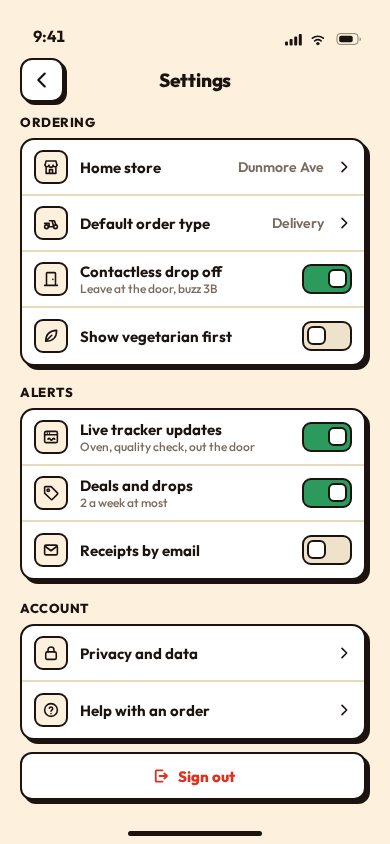
Slice is a complete pizza ordering app: welcome, sign in and a code, a home with the live order and tonight's deals, delivery or carryout with a store finder, the menu, search, a pizza page, a half and half builder with crust, size and sauce, toppings, deals and a deal builder, cart, checkout, payment, an order placed screen, a slice by slice live tracker, the driver on a map, past orders, rewards, a delivery pass, notifications, profile and settings. Crust cream, tomato red, cheese yellow and ink, with red gingham.
| Detail | Value |
|---|---|
| Screen type | Settings |
| App | Slice: Pizza ordering with a live tracker |
| Category | Food |
| Design language | Neubrutalism, light |
| Type | Fraunces for headings, Outfit for text |
| Colours | #fdf0dc background, #ffffff surface, #1b1310 text, #7a6a5c text-muted, #e0301e accent, #ffffff accent-contrast, #ffc23d secondary, #1b1310 border, #2c9a5c success, #e0301e danger |
What this screen says
- Settings
- Ordering
- Home store
- Dunmore Ave
- Default order type
- Delivery
- Contactless drop offLeave at the door, buzz 3B
- Show vegetarian first
- Alerts
- Live tracker updatesOven, quality check, out the door
- Deals and drops2 a week at most
- Receipts by email
- Account
- Privacy and data
- Help with an order
- Sign out
Around it in Slice
More settings screens
- Forage Settings: Farmers market and veg box
- Ember Settings: Smoker and grill thermometer
- Steep Settings: Tea brewing and tasting notes
- Brigade Settings: Restaurant kitchen and line ops
- Nibs Settings: Food allergy and label scanner
- Ladle Settings: Recipes and meal planning
- Pantry Settings: Grocery delivery
- Brewly Settings: Coffee ordering and loyalty
- Tabla Settings: Tables worth dressing for
- Corked Settings: Wine journal and cellar
- Crumb Settings: Neighbourhood bakery
- Tiffin Settings: Food delivery
Every food app settings screen
What makes a good settings screen
- Group options into clear sections. Account, notifications, privacy, appearance and help, with headings, so people scan to the right group.
- Label settings by their effect. "Daily reminder at 8:00" is clearer than "Reminders". Add a short description under options that need one.
- Use the right control. Toggles for on and off, a row that opens a list for choices, and sliders only for ranges.
- Apply changes immediately. Most mobile settings take effect when changed, with no Save button to forget.
The full settings screen guide and every example
Remix Slice free: describe your own app and it is drawn in this design. Or get its files from $10: Figma, React Native, SwiftUI, Flutter and HTML.