Templates · Settings screens · Food app · Aisle
Aisle Settings screen
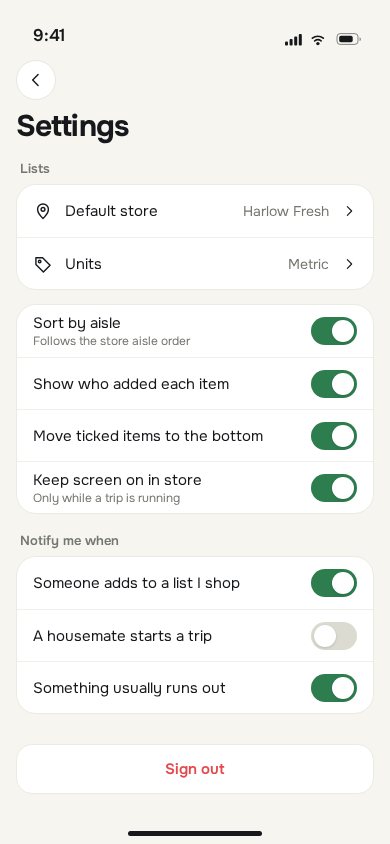
A settings screen from Aisle, a shared grocery lists app template in a Minimal style. Screen 25 of 25.
Aisle is a complete shared grocery app for a household: welcome, household setup, sign in, all lists, a list sorted by aisle with who added what, quick add with item tiles, item details, in store mode with a ticking progress bar and a finished trip, stores and their aisle order, recipes with ingredients sent to the list, recipe import, a weekly meal plan, grocery spending, activity, loyalty cards with a scannable barcode, a Plus plan, profile and settings. Paper, white and ink with tangerine, basil green and shelf tag yellow.
| Detail | Value |
|---|---|
| Screen type | Settings |
| App | Aisle: Shared grocery lists |
| Category | Food |
| Design language | Minimal, light |
| Type | Onest |
| Colours | #f6f5f0 background, #ffffff surface, #16181b text, #74776f text-muted, #ff6a2b accent, #ffffff accent-contrast, #2e7d4f secondary, #e8e7df border, #ffe06b highlight, #e5484d danger |
What this screen says
- Settings
- Lists
- Default store
- Harlow Fresh
- Units
- Metric
- Sort by aisle
- Follows the store aisle order
- Show who added each item
- Move ticked items to the bottom
- Keep screen on in store
- Only while a trip is running
- Notify me when
- Someone adds to a list I shop
- A housemate starts a trip
- Something usually runs out
- Sign out
Around it in Aisle
More settings screens
- Crock Settings: Fermentation and sourdough starter log
- Curbside Settings: Street food and food truck finder
- Forage Settings: Farmers market and veg box
- Ember Settings: Smoker and grill thermometer
- Steep Settings: Tea brewing and tasting notes
- Brigade Settings: Restaurant kitchen and line ops
- Nibs Settings: Food allergy and label scanner
- Ladle Settings: Recipes and meal planning
- Pantry Settings: Grocery delivery
- Brewly Settings: Coffee ordering and loyalty
- Tabla Settings: Tables worth dressing for
- Corked Settings: Wine journal and cellar
Every food app settings screen
What makes a good settings screen
- Group options into clear sections. Account, notifications, privacy, appearance and help, with headings, so people scan to the right group.
- Label settings by their effect. "Daily reminder at 8:00" is clearer than "Reminders". Add a short description under options that need one.
- Use the right control. Toggles for on and off, a row that opens a list for choices, and sliders only for ranges.
- Apply changes immediately. Most mobile settings take effect when changed, with no Save button to forget.
The full settings screen guide and every example
Remix Aisle free: describe your own app and it is drawn in this design. Or get its files from $10: Figma, React Native, SwiftUI, Flutter and HTML.