Templates · Onboarding screens · Smart home app · Kelvin
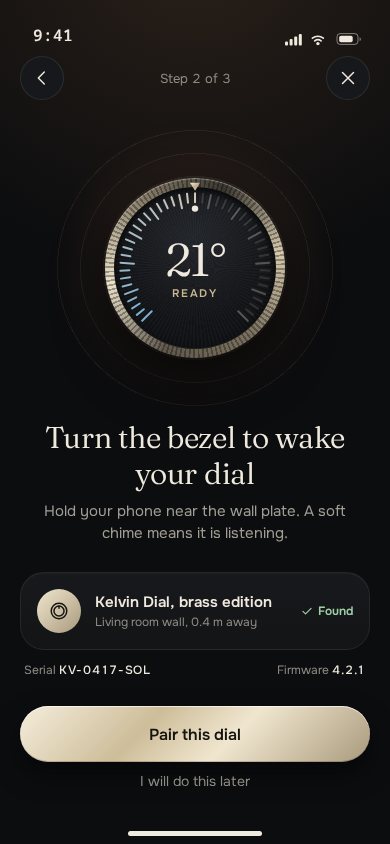
Kelvin Pair a dial screen
An onboarding screen from Kelvin, a climate and thermostat app template in a Luxury style. Screen 2 of 25.
Kelvin is a complete luxury climate app: welcome, pairing a dial, sign in, a home with the living room dial, rooms, a room control with heat, cool and auto, the wine cellar, scenes, a weekday schedule and period editor, the forecast plan, live arrival preheating, away mode, air quality, history, energy, devices, the heat pump, a service booking with confirmation, alerts, a Reserve membership, profile and settings. Obsidian and ivory with champagne metal and a glacier to ember temperature scale.
| Detail | Value |
|---|---|
| Screen type | Onboarding |
| App | Kelvin: Climate and thermostat |
| Category | Smart home |
| Design language | Luxury, dark |
| Type | Fraunces for headings, Onest for text |
| Colours | #0c0d0f background, #16181b surface, #efe9de text, #8f8b83 text-muted, #d8cbab accent, #17140f accent-contrast, #f0895a secondary, #26282c border, #e5675c danger |
What this screen says
- Step 2 of 3
- 21°READY
- Turn the bezel to wake your dial
- Hold your phone near the wall plate. A soft chime means it is listening.
- Kelvin Dial, brass editionLiving room wall, 0.4 m away
- Found
- Serial KV-0417-SOL Firmware 4.2.1
- Pair this dial
- I will do this later
Around it in Kelvin
More onboarding screens
- Boxed Welcome: Book movers and plan moving day
- Meter Welcome: Your energy supplier account
- Couch Welcome: TV remote, casting and watchlist
- Chime Welcome: Voice assistant and smart speaker
- Latch Welcome: Smart locks and guest access
- Mesh Welcome: Home Wi-Fi network
- Decibel Welcome: Multi-room speakers
- Nursery Welcome: Baby monitor camera and sleep
- Porch Welcome: Home security cameras
- Sundial Welcome: Solar panels and home battery
- Puddle Welcome: Garden watering and sprinklers
- Upkeep Welcome: Home maintenance calendar
Every smart home app onboarding screen
What makes a good onboarding screen
- One idea per screen. Each screen should say one thing in a headline people can read in a second. If a screen needs a paragraph, it is doing too much.
- Personalise with a purpose. Ask a question only if the answer changes what people see next, like a goal, a level or an interest. Then show that the answer mattered.
- Explain permissions before asking. Show your own screen saying why you need notifications, location or the camera before the system prompt. People who understand the reason are more likely to allow it.
- Let people skip. A visible skip or "I'll do this later" respects returning users and the impatient. Make sure skipping still lands them somewhere useful.
The full onboarding screen guide and every example
Remix Kelvin free: describe your own app and it is drawn in this design. Or get its files from $10: Figma, React Native, SwiftUI, Flutter and HTML.