Templates · Form and input screens · Smart home app · Kelvin
Kelvin Away mode screen
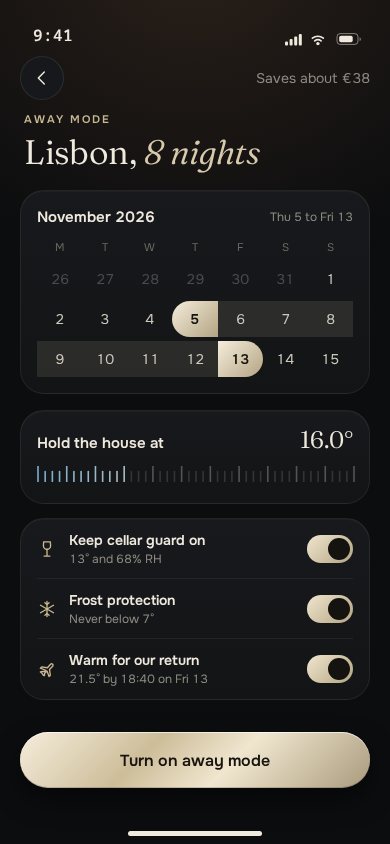
A form screen from Kelvin, a climate and thermostat app template in a Luxury style. Screen 14 of 25.
Kelvin is a complete luxury climate app: welcome, pairing a dial, sign in, a home with the living room dial, rooms, a room control with heat, cool and auto, the wine cellar, scenes, a weekday schedule and period editor, the forecast plan, live arrival preheating, away mode, air quality, history, energy, devices, the heat pump, a service booking with confirmation, alerts, a Reserve membership, profile and settings. Obsidian and ivory with champagne metal and a glacier to ember temperature scale.
| Detail | Value |
|---|---|
| Screen type | Form |
| App | Kelvin: Climate and thermostat |
| Category | Smart home |
| Design language | Luxury, dark |
| Type | Fraunces for headings, Onest for text |
| Colours | #0c0d0f background, #16181b surface, #efe9de text, #8f8b83 text-muted, #d8cbab accent, #17140f accent-contrast, #f0895a secondary, #26282c border, #e5675c danger |
What this screen says
- Saves about €38
- Away mode
- Lisbon, 8 nights
- November 2026Thu 5 to Fri 13
- M T W T F S S 26 27 28 29 30 31 1 2 3 4 5 6 7 8 9 10 11 12 13 14 15
- Hold the house at16.0°
- Keep cellar guard on13° and 68% RH
- Frost protectionNever below 7°
- Warm for our return21.5° by 18:40 on Fri 13
- Turn on away mode
Around it in Kelvin
More form and input screens
- Nursery Log sleep: Baby monitor camera and sleep
- Porch Motion zones: Home security cameras
- Sundial Battery mode: Solar panels and home battery
- Puddle Edit schedule: Garden watering and sprinklers
- Upkeep Log task: Home maintenance calendar
- Glow Colour: Light scenes and colour
- Tagged Your policy: Home inventory for insurance
- Lobby New guest pass: Apartment building app
- Sweep Edit map: Robot vacuum and mop
- Dusk New scenario: Smart home scenarios
- Lumen Add device: Smart home energy
- Abode Set a time: Smart home devices
Every smart home app form screen
What makes a good form screen
- Ask only what you need. Every field is a reason to stop. Remove optional fields or move them to later.
- Labels above fields. Visible labels stay readable while people type; placeholder-only labels disappear.
- Use the right keyboard and input. Number pads for amounts, email keyboards for email, pickers for dates and autofill for addresses and codes.
- Validate as people go. Show problems next to the field when people leave it, in words that say how to fix them.
The full form screen guide and every example
Remix Kelvin free: describe your own app and it is drawn in this design. Or get its files from $10: Figma, React Native, SwiftUI, Flutter and HTML.