Templates · Live tracking screens · Smart home app · Kelvin
Kelvin Arrival screen
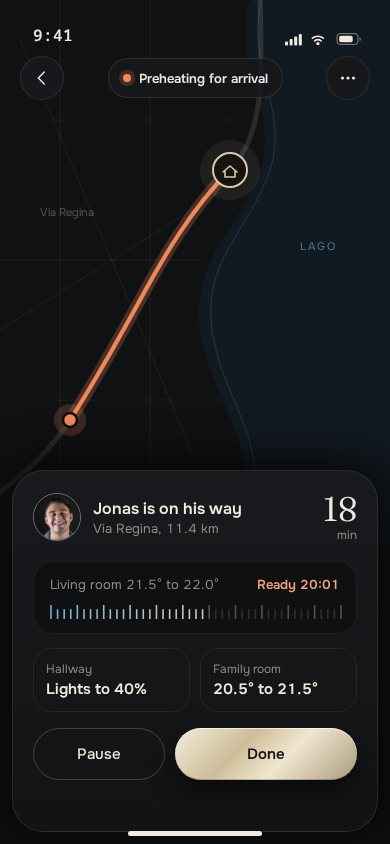
A tracking screen from Kelvin, a climate and thermostat app template in a Luxury style. Screen 13 of 25.
Kelvin is a complete luxury climate app: welcome, pairing a dial, sign in, a home with the living room dial, rooms, a room control with heat, cool and auto, the wine cellar, scenes, a weekday schedule and period editor, the forecast plan, live arrival preheating, away mode, air quality, history, energy, devices, the heat pump, a service booking with confirmation, alerts, a Reserve membership, profile and settings. Obsidian and ivory with champagne metal and a glacier to ember temperature scale.
| Detail | Value |
|---|---|
| Screen type | Tracking |
| App | Kelvin: Climate and thermostat |
| Category | Smart home |
| Design language | Luxury, dark |
| Type | Fraunces for headings, Onest for text |
| Colours | #0c0d0f background, #16181b surface, #efe9de text, #8f8b83 text-muted, #d8cbab accent, #17140f accent-contrast, #f0895a secondary, #26282c border, #e5675c danger |
What this screen says
- Preheating for arrival
- Jonas is on his wayVia Regina, 11.4 km
- 18min
- Living room 21.5° to 22.0° Ready 20:01
- Hallway Lights to 40%
- Family room 20.5° to 21.5°
- Pause
- Done
Around it in Kelvin
More live tracking screens
- Porch Arming: Home security cameras
- Sundial Live flow: Solar panels and home battery
- Puddle Watering: Garden watering and sprinklers
- Tagged Claim status: Home inventory for insurance
- Lobby Request: Apartment building app
- Sweep Mapping: Robot vacuum and mop
- Lumen Solar: Smart home energy
- Abode Robot vacuum: Smart home devices
- Boxed Live move: Book movers and plan moving day
- Meter Live usage: Your energy supplier account
- Couch Casting: TV remote, casting and watchlist
- Chime Timers: Voice assistant and smart speaker
Every smart home app tracking screen
What makes a good live tracking screen
- The live number is the hero. Arrival time, pace, distance or time left, in large type at the top or centre.
- Show status in words. "Driver is 3 minutes away" or "Halfway there" alongside the map or chart.
- Make it readable while moving. Large numbers, high contrast and big buttons for pause, stop or call.
- Keep updates calm. Smooth movement on the map and steady numbers; jumpy updates feel broken.
The full live tracking screen guide and every example
Remix Kelvin free: describe your own app and it is drawn in this design. Or get its files from $10: Figma, React Native, SwiftUI, Flutter and HTML.