Templates · List and feed screens · Productivity app · Jot
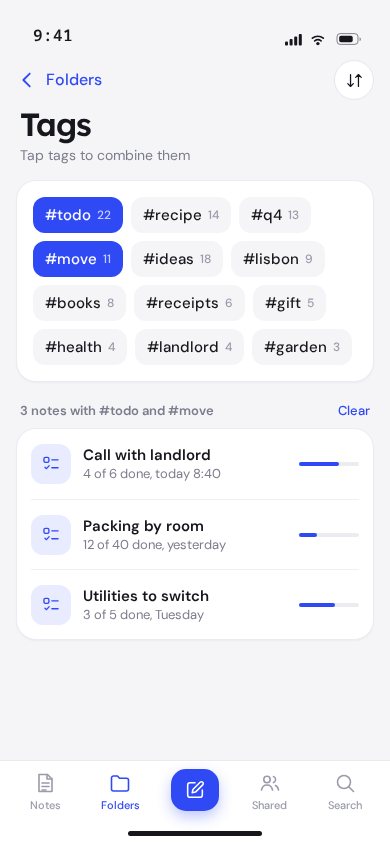
Jot Tags screen
A list screen from Jot, a quick notes and checklists app template in a Minimal style. Screen 15 of 25.
Jot is a complete everyday notes app: welcome, storage setup, sign in, a notes home with pinned cards and today's notes, folders with smart folders, a gallery folder, a note with a photo and checklist, a shared grocery checklist, a budget table, a sketch canvas with a tool tray, a document camera and the scanned result with found text, a format sheet, search that reaches inside tables and scans, tags, shared notes with live collaboration, sharing and an invite confirmation, a locked note, insights, notifications, a Plus plan, profile and settings. Cool paper grey and white with cobalt ink and a tangerine fold.
| Detail | Value |
|---|---|
| Screen type | List |
| App | Jot: Quick notes and checklists |
| Category | Productivity |
| Design language | Minimal, light |
| Type | Lexend for headings, DM Sans for text |
| Colours | #f5f5f8 background, #ffffff surface, #16161d text, #7c7d8c text-muted, #2f49f5 accent, #ffffff accent-contrast, #ff7a3d secondary, #ebebf1 border, #ec4f8b danger |
What this screen says
- Folders
- Tags
- Tap tags to combine them
- #todo22 #recipe14 #q413 #move11 #ideas18 #lisbon9 #books8 #receipts6 #gift5 #health4 #landlord4 #garden3
- 3 notes with #todo and #move Clear
- Call with landlord
- 4 of 6 done, today 8:40
- Packing by room
- 12 of 40 done, yesterday
- Utilities to switch
- 3 of 5 done, Tuesday
- Notes
- Shared
- Search
Around it in Jot
More list and feed screens
- Parley Add members: Team messenger
- Docket Notifications: Task and sprint planner
- Kanso Notifications: Tasks, calendar and chat
- Margin Notebooks: AI note taking
- Aide Notifications: Executive AI assistant
- Juno Models: AI chat assistant
- Opal Projects: Studio dashboard
- Chrono Alarms: World clock, timers and stopwatch
- Frontdesk Views: Customer support inbox
- Campaigns: Email marketing campaigns
- Outpost Calendar: Schedule social posts
- Pageview Reports: Website analytics
Every productivity app list screen
What makes a good list screen
- Show what people need to decide. Each row should carry just enough to choose: a title, one or two details and a status. Everything else belongs on the detail screen.
- Keep rows consistent. The same information in the same place on every row lets people scan down a column instead of reading each item.
- Group with headings. Dates, categories or status headings break long lists into chunks people can skip through.
- Make common actions quick. Swipe actions, a checkbox or a heart on the row save opening the item for small tasks.
The full list screen guide and every example
Remix Jot free: describe your own app and it is drawn in this design. Or get its files from $10: Figma, React Native, SwiftUI, Flutter and HTML.