Templates · Detail screens · Productivity app · Inkline
Inkline Audit trail screen
A detail screen from Inkline, a sign and send contracts app template in a Clinical style. Screen 17 of 25.
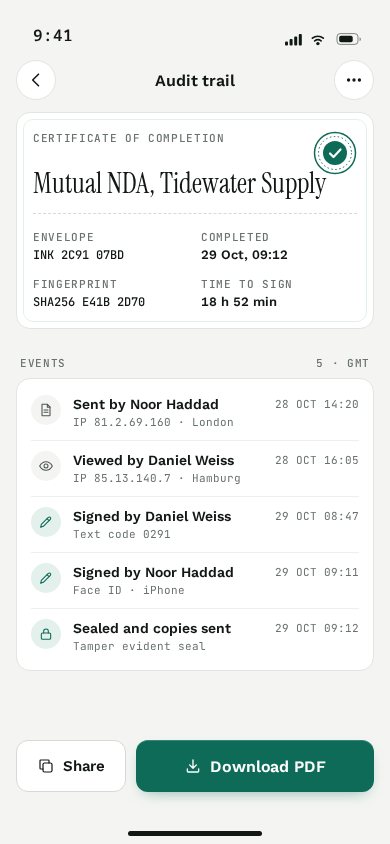
Inkline is a complete contract signing app: welcome, sign in, adopting a signature, a home with what needs your signature, an inbox of envelopes, an envelope with its signer chain, a document viewer with sign here flags, a signature pad, finish and signed, then sending your own: upload, recipients and signing order, placing fields on the page, review and sent, live status as a signer reads, the audit trail certificate, templates, search, contacts, turnaround insights, plans, notifications, profile and settings. Paper white and hairlines with deep viridian ink and amber flags.
| Detail | Value |
|---|---|
| Screen type | Detail |
| App | Inkline: Sign and send contracts |
| Category | Productivity |
| Design language | Clinical, light |
| Type | Instrument Serif for headings, Work Sans for text |
| Colours | #f4f5f2 background, #ffffff surface, #111714 text, #69726d text-muted, #0d6b57 accent, #e3f0eb accent-soft, #f5b638 secondary, #e2e5e0 border, #b23a2e danger |
What this screen says
- Audit trail
- Certificate of completion
- Mutual NDA, Tidewater Supply
- Envelope INK 2C91 07BD
- Completed 29 Oct, 09:12
- Fingerprint SHA256 E41B 2D70
- Time to sign 18 h 52 min
- Events 5 · GMT
- Sent by Noor Haddad
- IP 81.2.69.160 · London
- 28 OCT 14:20
- Viewed by Daniel Weiss
- IP 85.13.140.7 · Hamburg
- 28 OCT 16:05
- Signed by Daniel Weiss
- Text code 0291
- 29 OCT 08:47
- Signed by Noor Haddad
- Face ID · iPhone
- 29 OCT 09:11
- Sealed and copies sent
- Tamper evident seal
- 29 OCT 09:12
- Share
- Download PDF
Around it in Inkline
More detail screens
- Shortlist Job: Job search and application tracker
- Parley Chat: Team messenger
- Docket Task: Task and sprint planner
- Kanso Project: Tasks, calendar and chat
- Margin Notebook: AI note taking
- Aide Meeting brief: Executive AI assistant
- Juno Chat: AI chat assistant
- Opal Project: Studio dashboard
- Jot Note: Quick notes and checklists
- Chrono City: World clock, timers and stopwatch
- Frontdesk Ticket: Customer support inbox
- Campaign: Email marketing campaigns
Every productivity app detail screen
What makes a good detail screen
- Lead with what identifies the item. A large image or title, the price or status, and the key facts at the top. People should know they are in the right place at a glance.
- Keep the main action visible. A sticky bottom button for Add to cart, Book or Play stays reachable while people scroll through details.
- Order information by importance. The facts that decide the choice come first; reviews, specifications and fine print further down.
- Use progressive disclosure. Long descriptions, specifications and policies can expand on tap rather than filling the screen.
The full detail screen guide and every example
Remix Inkline free: describe your own app and it is drawn in this design. Or get its files from $10: Figma, React Native, SwiftUI, Flutter and HTML.