Templates · Detail screens · Productivity app · Chrono
Chrono City screen
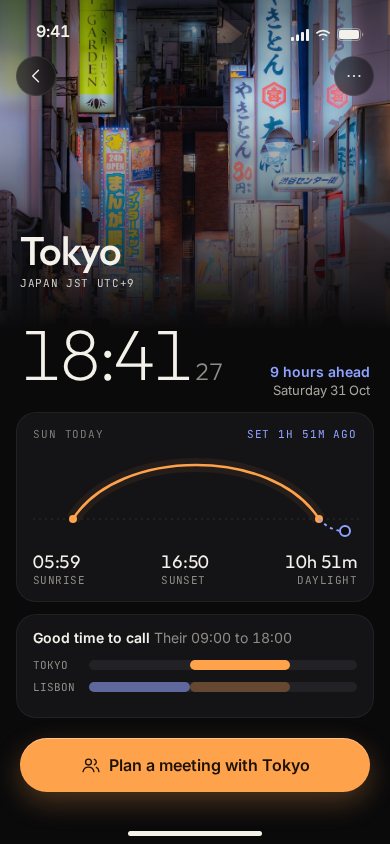
A detail screen from Chrono, a productivity app template in a Dark-first style. Screen 6 of 25.
Chrono is a complete clock app: welcome, picking your cities, sign in, a world clock with a live dial and a daylight band for every city, city search and a city page with its sun arc, a meeting planner across zones with an invite and confirmation, alarms with an editor and a ringing screen, bedtime, a stopwatch with laps and lap splits, timers with presets, a new timer and a running ring, focus sessions, insights, widgets, notifications, a Pro plan, profile and settings. Obsidian black with sodium amber for day and periwinkle for night.
| Detail | Value |
|---|---|
| Screen type | Detail |
| App | Chrono: World clock, timers and stopwatch |
| Category | Productivity |
| Design language | Dark-first, dark |
| Type | Outfit for headings, Inter for text |
| Colours | #0a0a0b background, #141416 surface, #f4f1ea text, #8f8c86 text-muted, #ffa24c accent, #1c1105 accent-contrast, #8fa2ff secondary, #242427 border, #ff6250 danger |
What this screen says
- Tokyo
- JAPAN JST UTC+9
- 9 hours aheadSaturday 31 Oct
- Sun today Set 1h 51m ago
- 05:59SUNRISE
- 16:50SUNSET
- 10h 51mDAYLIGHT
- Good time to call Their 09:00 to 18:00
- LISBON
- Plan a meeting with Tokyo
Around it in Chrono
More detail screens
- Shipyard Issue: Issue tracking for product teams
- Canvas File: Design files and comments on mobile
- Merge Repository: Code, pull requests and reviews
- Query Answer: AI answers with sources
- Glossa Translation: Translate text, voice and camera
- Layout Template: Design anything from templates
- Tick Task: To-do lists and reminders
- Beacon Person: Find your devices and people
- Staffroom Approval: HR, payslips and time off
- Slot Meeting: Booking links and meeting scheduling
- Sheet Record: Spreadsheets and databases
- Tunnel Country: VPN and online privacy
Every productivity app detail screen
What makes a good detail screen
- Lead with what identifies the item. A large image or title, the price or status, and the key facts at the top. People should know they are in the right place at a glance.
- Keep the main action visible. A sticky bottom button for Add to cart, Book or Play stays reachable while people scroll through details.
- Order information by importance. The facts that decide the choice come first; reviews, specifications and fine print further down.
- Use progressive disclosure. Long descriptions, specifications and policies can expand on tap rather than filling the screen.
The full detail screen guide and every example
Remix Chrono free: describe your own app and it is drawn in this design. Or get its files from $10: Figma, React Native, SwiftUI, Flutter and HTML.