Templates · Live tracking screens · Productivity app · Inkline
Inkline Live status screen
A tracking screen from Inkline, a sign and send contracts app template in a Clinical style. Screen 16 of 25.
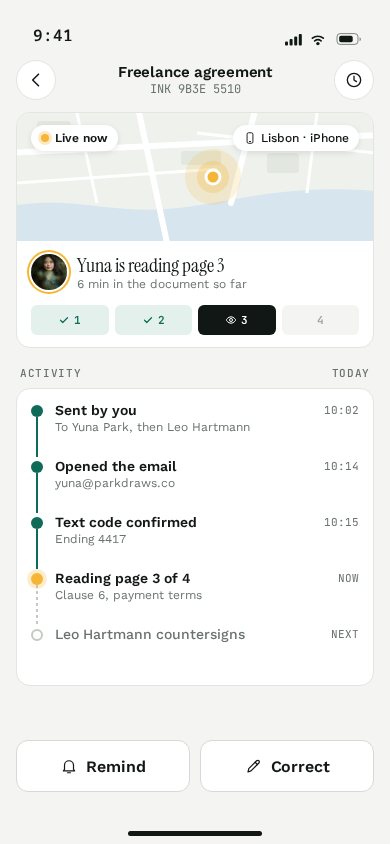
Inkline is a complete contract signing app: welcome, sign in, adopting a signature, a home with what needs your signature, an inbox of envelopes, an envelope with its signer chain, a document viewer with sign here flags, a signature pad, finish and signed, then sending your own: upload, recipients and signing order, placing fields on the page, review and sent, live status as a signer reads, the audit trail certificate, templates, search, contacts, turnaround insights, plans, notifications, profile and settings. Paper white and hairlines with deep viridian ink and amber flags.
| Detail | Value |
|---|---|
| Screen type | Tracking |
| App | Inkline: Sign and send contracts |
| Category | Productivity |
| Design language | Clinical, light |
| Type | Instrument Serif for headings, Work Sans for text |
| Colours | #f4f5f2 background, #ffffff surface, #111714 text, #69726d text-muted, #0d6b57 accent, #e3f0eb accent-soft, #f5b638 secondary, #e2e5e0 border, #b23a2e danger |
What this screen says
- Freelance agreement
- INK 9B3E 5510
- Live now Lisbon · iPhone
- Yuna is reading page 3
- 6 min in the document so far
- Activity Today
- Sent by you
- To Yuna Park, then Leo Hartmann
- Opened the email
- yuna@parkdraws.co
- Text code confirmed
- Ending 4417
- Reading page 3 of 4
- Clause 6, payment terms
- NOW
- Leo Hartmann countersigns
- NEXT
- Remind
- Correct
Around it in Inkline
More live tracking screens
- Query Searching: AI answers with sources
- Beacon Find nearby: Find your devices and people
- Tunnel Connecting: VPN and online privacy
- Ping Testing: Internet speed test
- Easel Voting: Collaborative whiteboard
- Beam Uploading: Send big files
- Lectern Rehearse: Slides and presenter remote
- Ringer In call: Phone, contacts and voicemail
- Pipeline Route: Sales CRM on the road
- Aim Focus: Goals and key results
- Scribe Transcribing: Voice memos to notes
- Dispatch Route: Field service jobs for technicians
Every productivity app tracking screen
What makes a good live tracking screen
- The live number is the hero. Arrival time, pace, distance or time left, in large type at the top or centre.
- Show status in words. "Driver is 3 minutes away" or "Halfway there" alongside the map or chart.
- Make it readable while moving. Large numbers, high contrast and big buttons for pause, stop or call.
- Keep updates calm. Smooth movement on the map and steady numbers; jumpy updates feel broken.
The full live tracking screen guide and every example
Remix Inkline free: describe your own app and it is drawn in this design. Or get its files from $10: Figma, React Native, SwiftUI, Flutter and HTML.