Templates · Detail screens · Productivity app · Frontdesk
Frontdesk Ticket screen
A detail screen from Frontdesk, a customer support inbox app template in an Enterprise style. Screen 6 of 25.
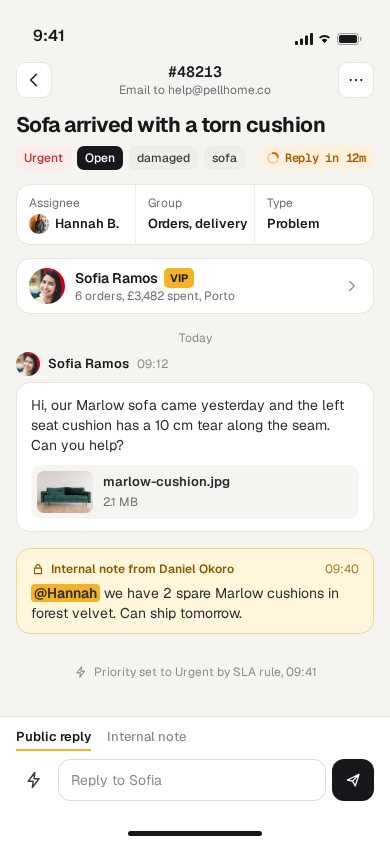
Frontdesk is a complete support agent app: welcome, sign in, a home with your queue and tickets at risk, saved views, an inbox sorted by SLA, a ticket thread with internal notes, the customer card, a reply with macros, mentions, assign and tag, a solved screen, live chats with a running conversation, a voice call with a live transcript, search, the customer's order with a partial refund, team performance, satisfaction ratings, the team, notifications, a Pro plan, profile and settings. Warm paper and white with ink and marigold.
| Detail | Value |
|---|---|
| Screen type | Detail |
| App | Frontdesk: Customer support inbox |
| Category | Productivity |
| Design language | Enterprise, light |
| Type | Geist |
| Colours | #f5f4f0 background, #ffffff surface, #17181c text, #6e6f78 text-muted, #f4b324 accent, #17181c accent-contrast, #17181c secondary, #e7e5df border, #d93a3a danger |
What this screen says
- #48213
- Email to help@pellhome.co
- Sofa arrived with a torn cushion
- Urgent Open damaged sofa Reply in 12m
- Assignee
- Hannah B.
- Group
- Orders, delivery
- Type
- Problem
- Sofia RamosVIP
- 6 orders, £3,482 spent, Porto
- Today
- Sofia Ramos 09:12
- Hi, our Marlow sofa came yesterday and the left seat cushion has a 10 cm tear along the seam. Can you help?
- marlow-cushion.jpg2.1 MB
- Internal note from Daniel Okoro09:40
- @Hannah we have 2 spare Marlow cushions in forest velvet. Can ship tomorrow.
- Priority set to Urgent by SLA rule, 09:41
- Public replyInternal note
- Reply to Sofia
Around it in Frontdesk
More detail screens
- Parley Chat: Team messenger
- Docket Task: Task and sprint planner
- Kanso Project: Tasks, calendar and chat
- Margin Notebook: AI note taking
- Aide Meeting brief: Executive AI assistant
- Juno Chat: AI chat assistant
- Opal Project: Studio dashboard
- Jot Note: Quick notes and checklists
- Chrono City: World clock, timers and stopwatch
- Campaign: Email marketing campaigns
- Outpost Previews: Schedule social posts
- Pageview Channel: Website analytics
Every productivity app detail screen
What makes a good detail screen
- Lead with what identifies the item. A large image or title, the price or status, and the key facts at the top. People should know they are in the right place at a glance.
- Keep the main action visible. A sticky bottom button for Add to cart, Book or Play stays reachable while people scroll through details.
- Order information by importance. The facts that decide the choice come first; reviews, specifications and fine print further down.
- Use progressive disclosure. Long descriptions, specifications and policies can expand on tap rather than filling the screen.
The full detail screen guide and every example
Remix Frontdesk free: describe your own app and it is drawn in this design. Or get its files from $10: Figma, React Native, SwiftUI, Flutter and HTML.