Templates · Detail screens · Productivity app · Shortlist
Shortlist Job screen
A detail screen from Shortlist, a job search and application tracker app template in an Enterprise style. Screen 11 of 25.
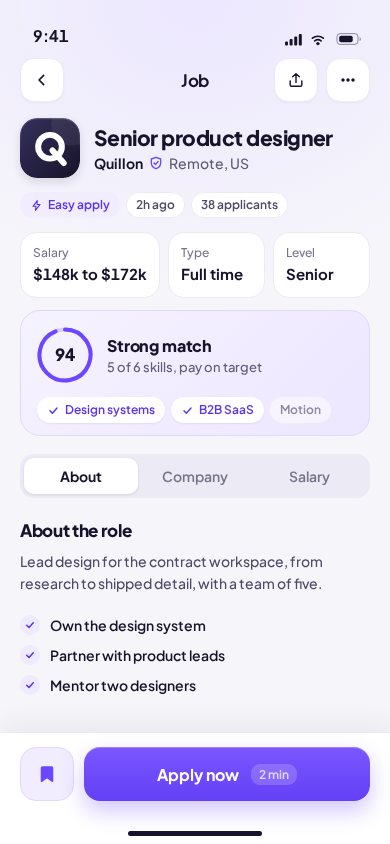
Shortlist is a complete job search app: welcome, sign in, a code and job preferences, a home with today's interview, the pipeline and top matches, search with filters and saved searches, a job page with a match breakdown, the company, a two step application with review and a sent confirmation, a tracker board, one application's timeline, the interview, prep questions with a practice timer, salary insights with a pay distribution, an offer breakdown, a Plus plan, notifications, profile and settings. Every company has its own drawn monogram and every role shows how well it matches.
| Detail | Value |
|---|---|
| Screen type | Detail |
| App | Shortlist: Job search and application tracker |
| Category | Productivity |
| Design language | Enterprise, light |
| Type | Plus Jakarta Sans |
| Colours | #f6f5fa background, #ffffff surface, #17132b text, #77738c text-muted, #6c47ff accent, #ffffff accent-contrast, #12a56b secondary, #eceaf4 border, #e5484d danger |
What this screen says
- Job
- Senior product designer
- Quillon Remote, US
- Easy apply 2h ago 38 applicants
- Salary $148k to $172k
- Type Full time
- Level Senior
- Strong match
- 5 of 6 skills, pay on target
- Design systems B2B SaaS Motion
- About Company Salary
- About the role
- Lead design for the contract workspace, from research to shipped detail, with a team of five.
- Own the design system
- Partner with product leads
- Mentor two designers
- Apply now2 min
Around it in Shortlist
More detail screens
- Canvas File: Design files and comments on mobile
- Merge Repository: Code, pull requests and reviews
- Query Answer: AI answers with sources
- Glossa Translation: Translate text, voice and camera
- Layout Template: Design anything from templates
- Tick Task: To-do lists and reminders
- Beacon Person: Find your devices and people
- Staffroom Approval: HR, payslips and time off
- Slot Meeting: Booking links and meeting scheduling
- Sheet Record: Spreadsheets and databases
- Tunnel Country: VPN and online privacy
- Ping Test details: Internet speed test
Every productivity app detail screen
What makes a good detail screen
- Lead with what identifies the item. A large image or title, the price or status, and the key facts at the top. People should know they are in the right place at a glance.
- Keep the main action visible. A sticky bottom button for Add to cart, Book or Play stays reachable while people scroll through details.
- Order information by importance. The facts that decide the choice come first; reviews, specifications and fine print further down.
- Use progressive disclosure. Long descriptions, specifications and policies can expand on tap rather than filling the screen.
The full detail screen guide and every example
Remix Shortlist free: describe your own app and it is drawn in this design. Or get its files from $10: Figma, React Native, SwiftUI, Flutter and HTML.