Templates · Detail screens · Productivity app · Aide
Aide Meeting brief screen
A detail screen from Aide, an executive AI assistant app template in a Dark-first style. Screen 10 of 25.
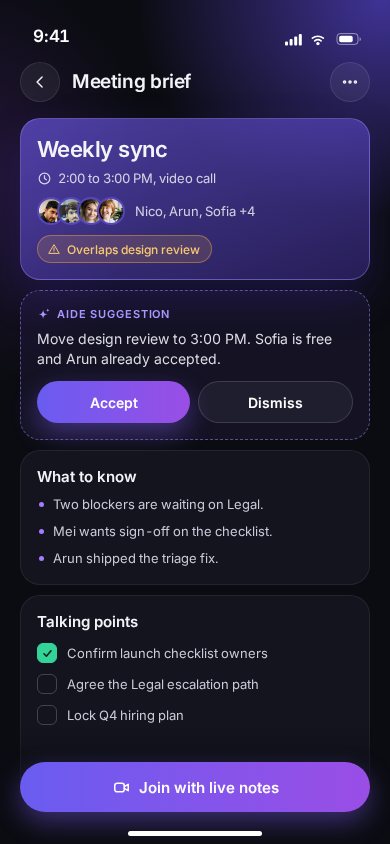
Aide is a complete AI chief of staff app: welcome, account and verification, connecting calendar and mail, a home with the daily briefing and agenda timeline, voice and typed commands, an inbox triaged with summaries and ready drafts, meeting briefs with overlap fixes, tasks and delegation, a focus timer, travel and documents at a glance, weekly insights, a plan screen, profile and settings. Near-black with a violet aurora, emerald status marks and amber warnings.
| Detail | Value |
|---|---|
| Screen type | Detail |
| App | Aide: Executive AI assistant |
| Category | Productivity |
| Design language | Dark-first, dark |
| Type | Inter |
| Colours | #0b0c12 background, #15161f surface, #f4f4f8 text, #8d90a3 text-muted, #7c5cf2 accent, #ffffff accent-contrast, #34d399 secondary, #262836 border, #f26d78 danger |
What this screen says
- Meeting brief
- Weekly sync
- 2:00 to 3:00 PM, video call
- Nico, Arun, Sofia +4
- Overlaps design review
- Aide suggestion
- Move design review to 3:00 PM. Sofia is free and Arun already accepted.
- Accept
- Dismiss
- What to know
- Two blockers are waiting on Legal.
- Mei wants sign-off on the checklist.
- Arun shipped the triage fix.
- Talking points
- Confirm launch checklist owners
- Agree the Legal escalation path
- Lock Q4 hiring plan
- Join with live notes
Around it in Aide
More detail screens
- Ping Test details: Internet speed test
- Glance Product: Visual search with the camera
- Replay Video: Record and share screen videos
- Easel Retro template: Collaborative whiteboard
- Token Account: Two-factor codes and sign-in approvals
- Beam Transfer: Send big files
- Parchment Document: Documents, edit and share
- Lectern Deck: Slides and presenter remote
- Ringer Call details: Phone, contacts and voicemail
- Pipeline Deal: Sales CRM on the road
- Aim Objective: Goals and key results
- Scribe Note: Voice memos to notes
Every productivity app detail screen
What makes a good detail screen
- Lead with what identifies the item. A large image or title, the price or status, and the key facts at the top. People should know they are in the right place at a glance.
- Keep the main action visible. A sticky bottom button for Add to cart, Book or Play stays reachable while people scroll through details.
- Order information by importance. The facts that decide the choice come first; reviews, specifications and fine print further down.
- Use progressive disclosure. Long descriptions, specifications and policies can expand on tap rather than filling the screen.
The full detail screen guide and every example
Remix Aide free: describe your own app and it is drawn in this design. Or get its files from $10: Figma, React Native, SwiftUI, Flutter and HTML.