Templates · Success and confirmation screens · Productivity app · Glossa
Glossa Pro unlocked screen
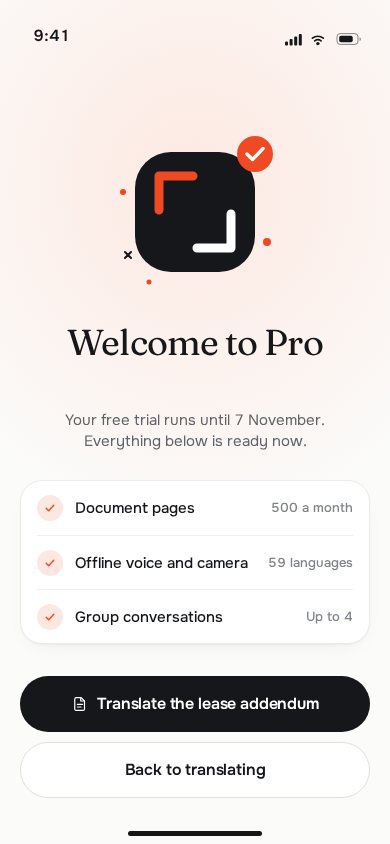
A success screen from Glossa, a productivity app template in a Minimal style. Screen 22 of 25.
Glossa is a complete translation app: welcome, language setup, sign in, a translator home, a full result with alternatives and examples, a language picker, voice and face to face conversation, live camera translation and a scanned menu, history, saved phrases and a phrasebook, a dictionary word page, documents, offline languages, practice cards, monthly insights, a Pro plan with checkout and confirmation, notifications, profile and settings. Off white and ink with one vermilion accent.
| Detail | Value |
|---|---|
| Screen type | Success |
| App | Glossa: Translate text, voice and camera |
| Category | Productivity |
| Design language | Minimal, light |
| Type | Fraunces for headings, Onest for text |
| Colours | #fbfbfa background, #ffffff surface, #f1f1ee surface-muted, #15171a text, #80838a text-muted, #ef4a23 accent, #fde8e1 accent-soft, #15171a secondary, #ebebe7 border, #1f9d6b success |
What this screen says
- Welcome to Pro
- Your free trial runs until 7 November. Everything below is ready now.
- Document pages
- 500 a month
- Offline voice and camera
- 59 languages
- Group conversations
- Up to 4
- Translate the lease addendum
- Back to translating
Around it in Glossa
More success and confirmation screens
- Layout Saved: Design anything from templates
- Tick Pro is on: To-do lists and reminders
- Beacon Lost mode on: Find your devices and people
- Staffroom Request sent: HR, payslips and time off
- Slot Confirmed: Booking links and meeting scheduling
- Sheet Submitted: Spreadsheets and databases
- Tunnel Plan active: VPN and online privacy
- Ping Result: Internet speed test
- Glance Order placed: Visual search with the camera
- Replay Video ready: Record and share screen videos
- Easel Invite sent: Collaborative whiteboard
- Token Account added: Two-factor codes and sign-in approvals
Every productivity app success screen
What makes a good confirmation screen
- Confirm in the headline. "Payment sent", "Table booked for Friday at 8" or "Lesson complete" in plain words, with a clear success colour or icon.
- Repeat the key details. Amount, date, reference number or score, so people do not need to check elsewhere that the right thing happened.
- Say what happens next. When the order arrives, when the money lands, when the next lesson unlocks.
- Offer the next step. Track the order, add to calendar, share, or start the next lesson. One primary action and a way back home.
The full confirmation screen guide and every example
Remix Glossa free: describe your own app and it is drawn in this design. Or get its files from $10: Figma, React Native, SwiftUI, Flutter and HTML.