Templates · Success and confirmation screens · Productivity app · Ping
Ping Result screen
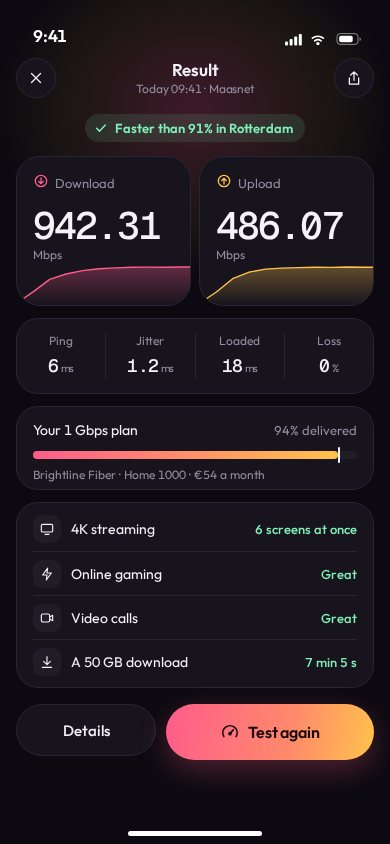
A success screen from Ping, an internet speed test app template in a Dark-first style. Screen 7 of 25.
Ping is a complete internet speed test app: welcome, location permission and sign in, a home with the GO gauge, live download and upload tests, a result with plan check, test details with latency ranges, results history and 30 day insights, server picker, a hex coverage map, provider rankings and a provider page, a video streaming test and its result, a Wi-Fi channel analyzer, a room by room signal finder, nearby outages, a report to your provider, a Plus plan with checkout, alerts, profile and settings. Plum black with signal rose, sodium amber and ice.
| Detail | Value |
|---|---|
| Screen type | Success |
| App | Ping: Internet speed test |
| Category | Productivity |
| Design language | Dark-first, dark |
| Type | Outfit |
| Colours | #0c0a10 background, #17141d surface, #f6f2f8 text, #958da3 text-muted, #ff5c8a accent, #1a0a12 accent-contrast, #ffc24b secondary, #2a2533 border, #ff6b5b danger |
What this screen says
- ResultToday 09:41 · Maasnet
- Faster than 91% in Rotterdam
- Download
- 942.31Mbps
- Upload
- 486.07Mbps
- Ping
- 6ms
- Jitter
- 1.2ms
- Loaded
- 18ms
- Loss
- Your 1 Gbps plan 94% delivered
- Brightline Fiber · Home 1000 · €54 a month
- 4K streaming 6 screens at once
- Online gaming Great
- Video calls Great
- A 50 GB download 7 min 5 s
- Details
- Test again
Around it in Ping
More success and confirmation screens
- Layout Saved: Design anything from templates
- Tick Pro is on: To-do lists and reminders
- Beacon Lost mode on: Find your devices and people
- Staffroom Request sent: HR, payslips and time off
- Slot Confirmed: Booking links and meeting scheduling
- Sheet Submitted: Spreadsheets and databases
- Tunnel Plan active: VPN and online privacy
- Glance Order placed: Visual search with the camera
- Replay Video ready: Record and share screen videos
- Easel Invite sent: Collaborative whiteboard
- Token Account added: Two-factor codes and sign-in approvals
- Beam Sent: Send big files
Every productivity app success screen
What makes a good confirmation screen
- Confirm in the headline. "Payment sent", "Table booked for Friday at 8" or "Lesson complete" in plain words, with a clear success colour or icon.
- Repeat the key details. Amount, date, reference number or score, so people do not need to check elsewhere that the right thing happened.
- Say what happens next. When the order arrives, when the money lands, when the next lesson unlocks.
- Offer the next step. Track the order, add to calendar, share, or start the next lesson. One primary action and a way back home.
The full confirmation screen guide and every example
Remix Ping free: describe your own app and it is drawn in this design. Or get its files from $10: Figma, React Native, SwiftUI, Flutter and HTML.