Templates · Success and confirmation screens · Productivity app · Slot
Slot Confirmed screen
A success screen from Slot, a booking links and meeting scheduling app template in a Minimal style. Screen 17 of 25.
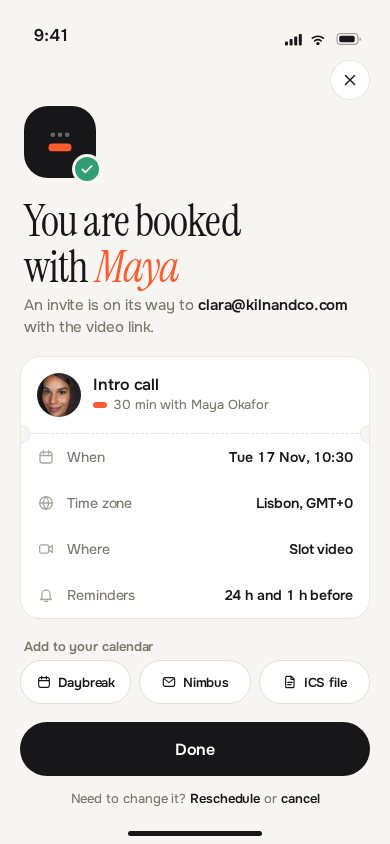
Slot is a complete scheduling app for people who take meetings: welcome, calendar connect, sign in, a home with today's timeline and your link, a week calendar, upcoming meetings and a meeting record, event types with an editor, weekly hours and date overrides, sharing, the invitee's booking page with day and time pickers, details and a confirmation, routing forms, reminder workflows, analytics, search, alerts, plans, account and settings. Paper and white with ink type, serif headlines and a vermilion accent.
| Detail | Value |
|---|---|
| Screen type | Success |
| App | Slot: Booking links and meeting scheduling |
| Category | Productivity |
| Design language | Minimal, light |
| Type | Instrument Serif for headings, Onest for text |
| Colours | #f6f5f1 background, #ffffff surface, #17171a text, #7a776f text-muted, #ff5b2e accent, #fff0ea accent-soft, #e8e5dd border, #7c6cf2 event-violet, #2f9e74 event-pine / success, #e9a23b event-amber, #2f7fd8 event-ocean, #e0453a danger |
What this screen says
- You are booked
- with Maya
- An invite is on its way to clara@kilnandco.com with the video link.
- Intro call30 min with Maya Okafor
- When Tue 17 Nov, 10:30
- Time zone Lisbon, GMT+0
- Where Slot video
- Reminders 24 h and 1 h before
- Add to your calendar
- Daybreak Nimbus ICS file
- Done
- Need to change it? Reschedule or cancel
Around it in Slot
More success and confirmation screens
- Chrono Invite sent: World clock, timers and stopwatch
- Frontdesk Solved: Customer support inbox
- Campaign Scheduled: Email marketing campaigns
- Outpost Scheduled: Schedule social posts
- Pageview Alert saved: Website analytics
- Polish Upgraded: Writing assistant and keyboard
- Tapline Tip sent: Link-in-bio pages and analytics
- Quill Upgraded: Docs, wikis and databases in one workspace
- Tandem Channel created: Team chat, channels and huddles
- Shipyard Cycle closed: Issue tracking for product teams
- Canvas Upgraded: Design files and comments on mobile
- Merged: Code, pull requests and reviews
Every productivity app success screen
What makes a good confirmation screen
- Confirm in the headline. "Payment sent", "Table booked for Friday at 8" or "Lesson complete" in plain words, with a clear success colour or icon.
- Repeat the key details. Amount, date, reference number or score, so people do not need to check elsewhere that the right thing happened.
- Say what happens next. When the order arrives, when the money lands, when the next lesson unlocks.
- Offer the next step. Track the order, add to calendar, share, or start the next lesson. One primary action and a way back home.
The full confirmation screen guide and every example
Remix Slot free: describe your own app and it is drawn in this design. Or get its files from $10: Figma, React Native, SwiftUI, Flutter and HTML.