Templates · Home screens · Lifestyle app · Fade
Fade Home screen
A home screen from Fade, a barber booking app template in a Neubrutalism style. Screen 4 of 25.
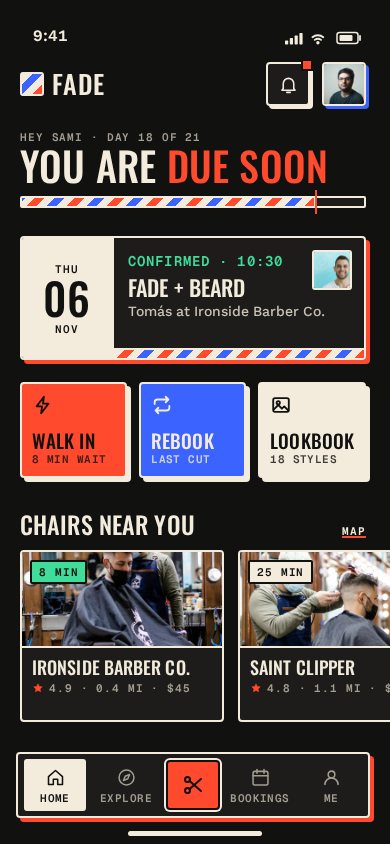
Fade is a complete barber booking app: welcome, sign in and a code, a home that knows when you are due, a map of shops nearby, search, a shop with its chairs and menu, a barber with a portfolio, a lookbook and a fade map for each style, services, a time picker, cut notes with guard numbers, review and a booked ticket, bookings and an appointment, a live walk in queue, rating with a tip, a cut log, a punch card, Fade Pass, notifications, profile and settings. Ink black, cream, pole red and cobalt.
| Detail | Value |
|---|---|
| Screen type | Home |
| App | Fade: Barber booking |
| Category | Lifestyle |
| Design language | Neubrutalism, dark |
| Type | Oswald for headings, Work Sans for text |
| Colours | #111110 background, #1d1c1a surface, #f3ecdd text, #a39d90 text-muted, #ff4a2e accent, #111110 accent-contrast, #3b63ff secondary, #f3ecdd border, #3fdc9a success |
What this screen says
- Fade
- Hey Sami · day 18 of 21
- You are due soon
- Thu 06Nov
- Confirmed · 10:30
- Fade + beard
- Tomás at Ironside Barber Co.
- Walk in
- 8 min wait
- Rebook
- Last cut
- Lookbook
- 18 styles
- Chairs near you
- Map
- 8 min
- Ironside Barber Co.
- 4.9 · 0.4 mi · $45
- 25 min
- Saint Clipper
- 4.8 · 1.1 mi · $50
- Home
- Explore
- Bookings
- Me
Around it in Fade
More home screens
- Stub Home: Fan to fan ticket resale
- Trove Home: Visual ideas and boards
- Vidi Home: Video platform for creators
- Roll Library: Photo library and backups
- Splice Home: Video editor for short clips
- Blush Home: Beauty and makeup shopping
- Flatpack Home: Furniture store with room previews
- Column Inbox: Newsletters and independent writers
- Fetch Home: Dog walkers and pet sitters
- Forecourt Home: Buy and sell used cars
- Tower Home: Mobile plan, data and bills
- Haul Home: Bargain fashion and finds
Every lifestyle app home screen
What makes a good home screen
- Put the most important thing first. Decide the one thing most people come for, like today's workout, a balance or the next booking, and give it the top of the screen.
- Make it feel current. Greetings with the time of day, today's date, fresh numbers and recent activity tell people the app is alive and about them.
- Keep quick actions within thumb reach. The two or three things people do most should be one tap away, in the lower part of the screen or a floating button.
- Group related content in clear sections. Use headings and spacing so the screen scans as a few blocks, not a long mixed list.
The full home screen guide and every example
Remix Fade free: describe your own app and it is drawn in this design. Or get its files from $10: Figma, React Native, SwiftUI, Flutter and HTML.