Templates · Home screens · Lifestyle app · Roll
Roll Library screen
A home screen from Roll, a photo library and backups app template in a Minimal style. Screen 4 of 25.
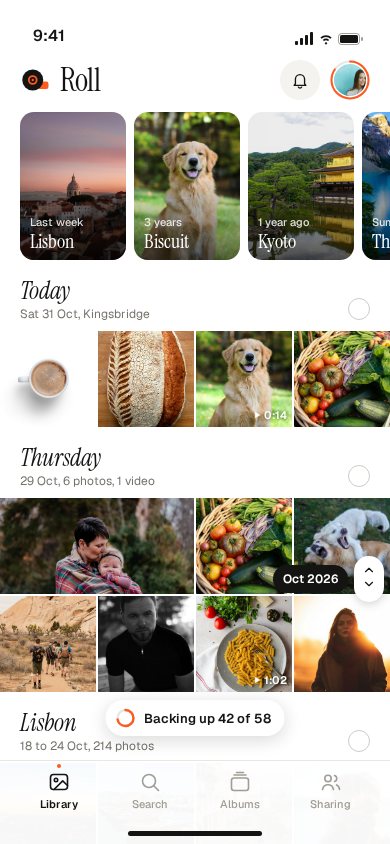
Roll is a complete photo library app: welcome, choosing what to back up, sign in, a library grid grouped by day, a photo viewer with its details, an editor, search by people, places and things, results, a person's photos, albums and an album, a memory story, a new album, sharing a link, shared albums and a partner library, live backup progress, storage and a clean up review, ordering prints with confirmation, a storage plan, activity, account and settings. White and warm grey with near black ink and a persimmon accent.
| Detail | Value |
|---|---|
| Screen type | Home |
| App | Roll: Photo library and backups |
| Category | Lifestyle |
| Design language | Minimal, light |
| Type | Instrument Serif for headings, Geist for text |
| Colours | #ffffff background, #f4f3ef surface, #141413 text, #76736b text-muted, #ff5a1f accent, #fff0e8 accent-soft, #e9e7e1 border, #1f9d5c success, #e5383b danger |
What this screen says
- Roll
- Last weekLisbon
- 3 yearsBiscuit
- 1 year agoKyoto
- Summer 2024The lake
- Today
- Sat 31 Oct, Kingsbridge
- Thursday
- 29 Oct, 6 photos, 1 video
- Lisbon
- 18 to 24 Oct, 214 photos
- Oct 2026
- Backing up 42 of 58
- Library Search Albums Sharing
Around it in Roll
More home screens
- Emporia Home: Everything store
- Sable Home: Fashion store
- Bazaar Home: Local buy and sell
- Kiln Home: Handmade marketplace
- Drape Today: AI wardrobe and daily outfits
- Mane Home: AI hairstyle try-on
- Annex Home: AI interior redesign
- Kino Home: Film and series streaming
- Waybill Home: Every parcel, read like its label
- Torque Home: The workshop manual for your own car
- Vetly Home: Pet health record
- Stitch Home: A knitting companion drawn as one big knitting chart
Every lifestyle app home screen
What makes a good home screen
- Put the most important thing first. Decide the one thing most people come for, like today's workout, a balance or the next booking, and give it the top of the screen.
- Make it feel current. Greetings with the time of day, today's date, fresh numbers and recent activity tell people the app is alive and about them.
- Keep quick actions within thumb reach. The two or three things people do most should be one tap away, in the lower part of the screen or a floating button.
- Group related content in clear sections. Use headings and spacing so the screen scans as a few blocks, not a long mixed list.
The full home screen guide and every example
Remix Roll free: describe your own app and it is drawn in this design. Or get its files from $10: Figma, React Native, SwiftUI, Flutter and HTML.