Templates · Home screens · Lifestyle app · Column
Column Inbox screen
A home screen from Column, a newsletters and independent writers app template in a Minimal style. Screen 4 of 25.
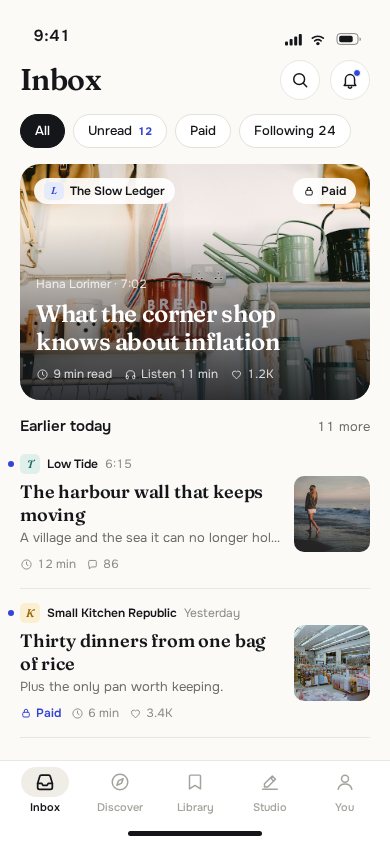
Column is a complete newsletter app for readers and independent writers: welcome, topics and sign in, an inbox of new posts from subscriptions, discover with rising publications, search, a publication home, a long read with highlights, comments, an audio version, a library and saved highlights, a paid plan with checkout and a confirmation, a writer profile, subscriptions, notifications, and a writer studio with subscriber and revenue stats, post stats, a composer, send settings and a published screen, plus profile and settings. Paper white and ink with an ultramarine accent and highlighter yellow.
| Detail | Value |
|---|---|
| Screen type | Home |
| App | Column: Newsletters and independent writers |
| Category | Lifestyle |
| Design language | Minimal, light |
| Type | Fraunces for headings, Onest for text |
| Colours | #fbfaf7 background, #ffffff surface, #15161a text, #6f6e69 text-muted, #3346d3 accent, #ffffff accent-contrast, #ffe680 secondary, #e9e7e0 border, #d6452f danger |
What this screen says
- Inbox
- All Unread12 Paid Following 24
- L The Slow Ledger Paid
- Hana Lorimer · 7:02
- What the corner shop knows about inflation
- 9 min read Listen 11 min 1.2K
- Earlier today
- 11 more
- T Low Tide6:15
- The harbour wall that keeps moving
- A village and the sea it can no longer hold back.
- 12 min 86
- K Small Kitchen RepublicYesterday
- Thirty dinners from one bag of rice
- Plus the only pan worth keeping.
- Paid 6 min 3.4K
- Discover
- Library
- Studio
- You
Around it in Column
More home screens
- Circuit Home: Electronics store with trade-in and repairs
- Provenance Shop: Authenticated luxury resale
- Gavel Home: Live online auctions
- Tidy Home: Book home cleaners
- Dorm Home: Find student housing
- Hem Home: Tailoring and alterations, collected
- Lendly Explore: Borrow things from neighbours
- Stub Home: Fan to fan ticket resale
- Trove Home: Visual ideas and boards
- Vidi Home: Video platform for creators
- Roll Library: Photo library and backups
- Splice Home: Video editor for short clips
Every lifestyle app home screen
What makes a good home screen
- Put the most important thing first. Decide the one thing most people come for, like today's workout, a balance or the next booking, and give it the top of the screen.
- Make it feel current. Greetings with the time of day, today's date, fresh numbers and recent activity tell people the app is alive and about them.
- Keep quick actions within thumb reach. The two or three things people do most should be one tap away, in the lower part of the screen or a floating button.
- Group related content in clear sections. Use headings and spacing so the screen scans as a few blocks, not a long mixed list.
The full home screen guide and every example
Remix Column free: describe your own app and it is drawn in this design. Or get its files from $10: Figma, React Native, SwiftUI, Flutter and HTML.