Templates · Home screens · Lifestyle app · Haul
Haul Home screen
A home screen from Haul, a bargain fashion and finds app template in a Gen Z style. Screen 4 of 25.
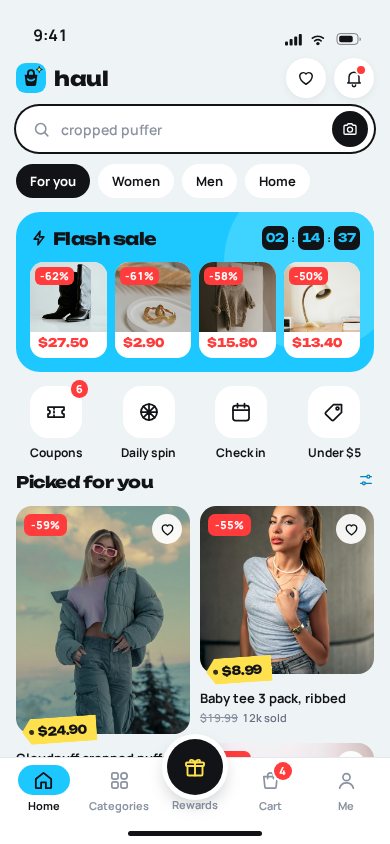
Haul is a complete deal shopping app: welcome, a style picker, sign up with a first order coupon, an endless picked for you feed, flash sales by time slot, categories, search results, a product page with a size guide and photo reviews, a cart with a bundle discount meter, coupons, checkout, order placed, orders, live parcel tracking, returns, rewards with a daily check in and a prize wheel, a wishlist, writing a photo review, a Club membership, notifications, profile and settings. Icy gray and white with pool cyan, tag yellow and flash red.
| Detail | Value |
|---|---|
| Screen type | Home |
| App | Haul: Bargain fashion and finds |
| Category | Lifestyle |
| Design language | Gen Z, light |
| Type | Unbounded for headings, Manrope for text |
| Colours | #eef3f6 background, #ffffff surface, #111317 text, #687080 text-muted, #1cc8ff accent, #111317 accent-contrast, #ffe14d secondary, #ff3b3b danger, #e2e8ed border |
What this screen says
- haul
- cropped puffer
- For you Women Men Home
- Flash sale
- 6Coupons
- Daily spin
- Check in
- Under $5
- Picked for you
- Cloudpuff cropped puffer jacket
- $61.003.2k sold
- Mini croc top handle bag
- $22.00870 sold
- Baby tee 3 pack, ribbed
- $19.9912k sold
- Suede ankle boots
- $44.001.1k sold
- Home
- Categories
- Rewards
- 4Cart
- Me
Around it in Haul
More home screens
- Kino Home: Film and series streaming
- Waybill Home: Every parcel, read like its label
- Torque Home: The workshop manual for your own car
- Vetly Home: Pet health record
- Stitch Home: A knitting companion drawn as one big knitting chart
- Roost Home: Your shared house, stuck to the fridge door
- Trellis Home: Vegetable garden planner
- Grain Library: Camera and photo editor
- Posy Home: Flower delivery and weekly stems
- Fern Home: Plant care
- Doorstep Home: Homes for sale and rent
- Rewear Home: Secondhand fashion marketplace
Every lifestyle app home screen
What makes a good home screen
- Put the most important thing first. Decide the one thing most people come for, like today's workout, a balance or the next booking, and give it the top of the screen.
- Make it feel current. Greetings with the time of day, today's date, fresh numbers and recent activity tell people the app is alive and about them.
- Keep quick actions within thumb reach. The two or three things people do most should be one tap away, in the lower part of the screen or a floating button.
- Group related content in clear sections. Use headings and spacing so the screen scans as a few blocks, not a long mixed list.
The full home screen guide and every example
Remix Haul free: describe your own app and it is drawn in this design. Or get its files from $10: Figma, React Native, SwiftUI, Flutter and HTML.