Templates · Home screens · Lifestyle app · Blush
Blush Home screen
A home screen from Blush, a beauty and makeup shopping app template in a Luxury style. Screen 4 of 25.
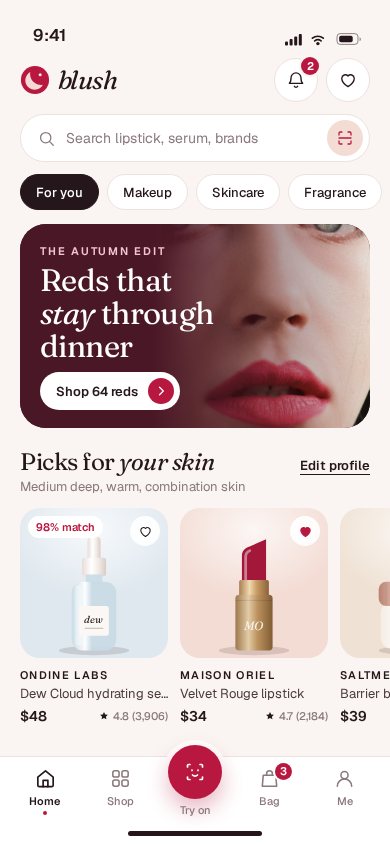
Blush is a complete beauty store: welcome, a beauty profile for skin tone, type and concerns, sign in, a home with an edit and picks for you, shop by category, search, a lipstick results grid with filters, a product page with shade beads, a live virtual try on, reviews with a rating breakdown, a brand page, a skincare routine, loves, a bag with free samples, checkout, order placed, live delivery tracking, orders, the Blush Club points dashboard, a Blush Plus plan, notifications, profile and settings. Porcelain and white with aubergine ink and lacquer rouge.
| Detail | Value |
|---|---|
| Screen type | Home |
| App | Blush: Beauty and makeup shopping |
| Category | Lifestyle |
| Design language | Luxury, light |
| Type | Fraunces for headings, Geist for text |
| Colours | #faf5f2 background, #ffffff surface, #24161a text, #8a787c text-muted, #b8183f accent, #ffffff accent-contrast, #f3dcd4 secondary, #eee2dd border, #2f7a5b success |
What this screen says
- blush 2
- Search lipstick, serum, brands
- For you Makeup Skincare Fragrance Hair
- The autumn edit
- Reds that stay through dinner
- Shop 64 reds
- Picks for your skin
- Edit profile
- Medium deep, warm, combination skin
- 98% match
- Ondine Labs
- Dew Cloud hydrating serum
- $48 4.8 (3,906)
- Maison Oriel
- Velvet Rouge lipstick
- $34 4.7 (2,184)
- Saltmere
- Barrier balm night cream
- $39 4.6 (1,412)
- Home
- Shop
- Try on
- Bag 3
- Me
Around it in Blush
More home screens
- Provenance Shop: Authenticated luxury resale
- Gavel Home: Live online auctions
- Tidy Home: Book home cleaners
- Dorm Home: Find student housing
- Hem Home: Tailoring and alterations, collected
- Lendly Explore: Borrow things from neighbours
- Stub Home: Fan to fan ticket resale
- Trove Home: Visual ideas and boards
- Vidi Home: Video platform for creators
- Roll Library: Photo library and backups
- Splice Home: Video editor for short clips
- Flatpack Home: Furniture store with room previews
Every lifestyle app home screen
What makes a good home screen
- Put the most important thing first. Decide the one thing most people come for, like today's workout, a balance or the next booking, and give it the top of the screen.
- Make it feel current. Greetings with the time of day, today's date, fresh numbers and recent activity tell people the app is alive and about them.
- Keep quick actions within thumb reach. The two or three things people do most should be one tap away, in the lower part of the screen or a floating button.
- Group related content in clear sections. Use headings and spacing so the screen scans as a few blocks, not a long mixed list.
The full home screen guide and every example
Remix Blush free: describe your own app and it is drawn in this design. Or get its files from $10: Figma, React Native, SwiftUI, Flutter and HTML.