Templates · Home screens · Lifestyle app · Splice
Splice Home screen
A home screen from Splice, a video editor for short clips app template in a Dark-first style. Screen 3 of 25.
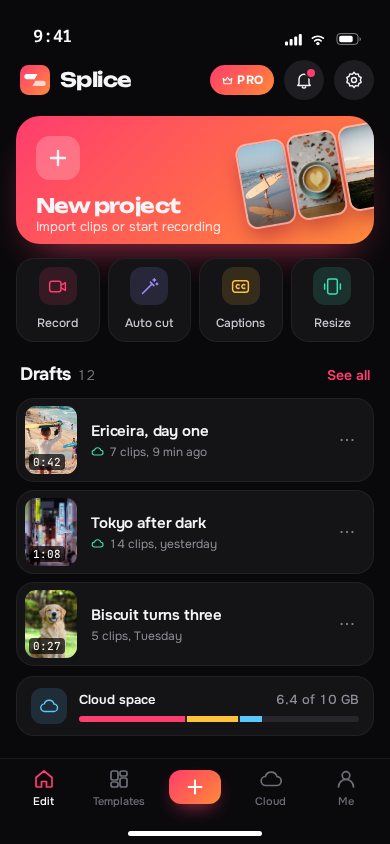
Splice is a complete short video editor: welcome and sign in, a home with a new project card, quick tools and drafts, a camera with segment recording, a media picker, the multi-track editor, clip trim, speed curves, text styling, auto captions, a sound library, effects, filters and adjust, canvas and background, templates and a template preview, export settings, live export progress and a saved screen, drafts, cloud storage stats, notifications, a Pro plan, profile and settings. Near black with a hot pink to tangerine gradient and colour coded timeline lanes.
| Detail | Value |
|---|---|
| Screen type | Home |
| App | Splice: Video editor for short clips |
| Category | Lifestyle |
| Design language | Dark-first, dark |
| Type | Unbounded for headings, Onest for text |
| Colours | #09090b background, #141417 surface, #f5f5f7 text, #8e8e98 text-muted, #ff3d6e accent, #ffffff accent-contrast, #ffc23d secondary, #26262c border, #ff5a52 danger |
What this screen says
- Splice
- PRO
- New project
- Import clips or start recording
- Record
- Auto cut
- Captions
- Resize
- Drafts
- 12See all
- Ericeira, day one
- 7 clips, 9 min ago
- Tokyo after dark
- 14 clips, yesterday
- Biscuit turns three
- 5 clips, Tuesday
- Cloud space 6.4 of 10 GB
- Edit
- Templates
- Cloud
- Me
Around it in Splice
More home screens
- Stitch Home: A knitting companion drawn as one big knitting chart
- Roost Home: Your shared house, stuck to the fridge door
- Trellis Home: Vegetable garden planner
- Grain Library: Camera and photo editor
- Posy Home: Flower delivery and weekly stems
- Fern Home: Plant care
- Doorstep Home: Homes for sale and rent
- Rewear Home: Secondhand fashion marketplace
- Laced Home: Sneaker drops and raffles
- Gloss Home: Salon and spa booking
- Vow Home: Wedding planner
- Drizzle Home: Weather with living skies
Every lifestyle app home screen
What makes a good home screen
- Put the most important thing first. Decide the one thing most people come for, like today's workout, a balance or the next booking, and give it the top of the screen.
- Make it feel current. Greetings with the time of day, today's date, fresh numbers and recent activity tell people the app is alive and about them.
- Keep quick actions within thumb reach. The two or three things people do most should be one tap away, in the lower part of the screen or a floating button.
- Group related content in clear sections. Use headings and spacing so the screen scans as a few blocks, not a long mixed list.
The full home screen guide and every example
Remix Splice free: describe your own app and it is drawn in this design. Or get its files from $10: Figma, React Native, SwiftUI, Flutter and HTML.