Templates · Home screens · Travel app · Detour
Detour Map screen
A home screen from Detour, a community driving navigation app template in a Playful style. Screen 4 of 25.
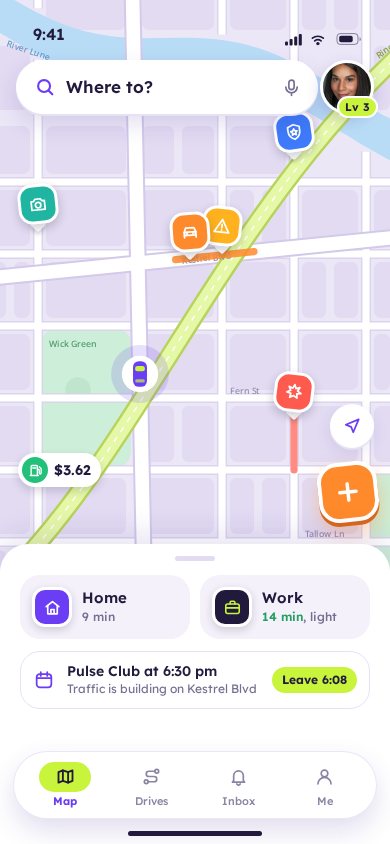
Detour is a complete community driving app: welcome, home and work setup, sign in, a live map with driver reports, search with categories, fuel prices and a station page, route options, a tilted turn by turn drive with a police alert, a report sheet, a hazard report and its thank you, arrival, sharing your ETA, planned drives with a leave by chart, driving stats, driver levels, an inbox, profile, car icons, voices, a Plus plan and settings. Lavender, grape and lime with a bright sticker colour for every kind of report.
| Detail | Value |
|---|---|
| Screen type | Home |
| App | Detour: Community driving navigation |
| Category | Travel |
| Design language | Playful, light |
| Type | Outfit for headings, Lexend for text |
| Colours | #f4f1fa background, #ffffff surface, #221a3d text, #776f92 text-muted, #6b3df5 accent, #ffffff accent-contrast, #c8f53c secondary, #e7e1f4 border, #ff5a4e danger |
What this screen says
- Where to?
- Lv 3
- Home9 min
- Work14 min, light
- Pulse Club at 6:30 pmTraffic is building on Kestrel Blvd
- Leave 6:08
- Map
- Drives
- Inbox
- Me
Around it in Detour
More home screens
- Nomad Explore: Travel eSIM data plans
- Tern Home: Ferry and island hopping
- Berth Home: Night trains and sleeper cabins
- Caravan Home: Campervan rental and road trips
- Layover Home: Airport guide, gates and lounges
- Permit Wallet: Visas and travel documents wallet
- Backroad Home: Road trip planner with stops
- Bunk Home: Hostels and backpacker meetups
- Piazza Today: Self-guided city walking tours
- Fjord Today: Cruise companion on board
- Atlas Map: Maps and navigation
- Kerb Map: Parking that reads like a road sign
What makes a good home screen
- Put the most important thing first. Decide the one thing most people come for, like today's workout, a balance or the next booking, and give it the top of the screen.
- Make it feel current. Greetings with the time of day, today's date, fresh numbers and recent activity tell people the app is alive and about them.
- Keep quick actions within thumb reach. The two or three things people do most should be one tap away, in the lower part of the screen or a floating button.
- Group related content in clear sections. Use headings and spacing so the screen scans as a few blocks, not a long mixed list.
The full home screen guide and every example
Remix Detour free: describe your own app and it is drawn in this design. Or get its files from $10: Figma, React Native, SwiftUI, Flutter and HTML.