Templates · Profile screens · Productivity app · Daybook
Daybook Profile screen
A profile screen from Daybook, a calendar and planner app template in a Minimal style. Screen 24 of 25.
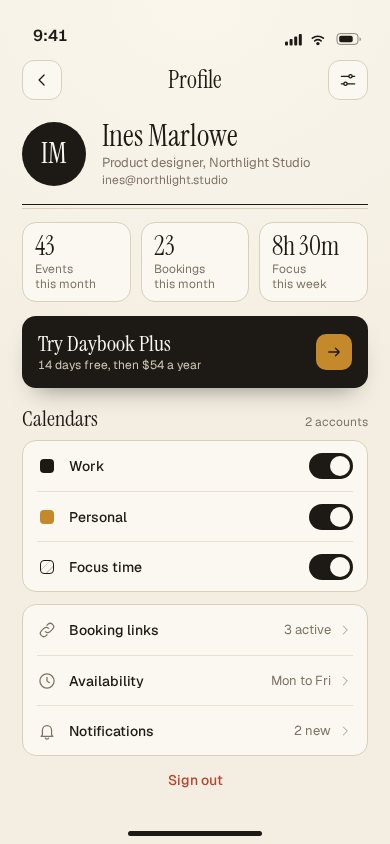
Daybook is a complete calendar and planner: welcome, sign in, a code and connecting calendars, a today page with what is next, day, week and month views, an event with guests and replies, new event, find a time across people, search, booking links with availability and a guest booking page, tasks, time insights, notifications, a Plus plan, profile and settings. Work is ink, personal is ochre and focus time is hatched, so a week reads at a glance without a rainbow.
| Detail | Value |
|---|---|
| Screen type | Profile |
| App | Daybook: Calendar and planner |
| Category | Productivity |
| Design language | Minimal, light |
| Type | Geist |
| Colours | #f4eee2 background, #fbf8f1 surface, #1d1a15 text, #7d7466 text-muted, #c4892a accent, #1d1a15 accent-contrast, #ebe3d2 secondary, #d9cfbb border, #b5452c danger |
What this screen says
- Profile
- IM
- Ines Marlowe
- Product designer, Northlight Studio
- ines@northlight.studio
- 43Events
- this month
- 23Bookings
- 8h 30mFocus
- this week
- Try Daybook Plus
- 14 days free, then $54 a year
- Calendars
- 2 accounts
- Work
- Personal
- Focus time
- Booking links
- 3 active
- Availability
- Mon to Fri
- Notifications
- 2 new
- Sign out
Around it in Daybook
More profile screens
- Scanly Profile: Document scanner
- Keyring Profile: Password manager
- Rota Teammate: Shift scheduling for hourly teams
- Inkwell Profile: Daily journal
- Shortlist Profile: Job search and application tracker
- Parley Profile: Team messenger
- Docket Teammate: Task and sprint planner
- Kanso Profile: Tasks, calendar and chat
- Margin Profile: AI note taking
- Aide Profile: Executive AI assistant
- Juno Profile: AI chat assistant
- Opal Profile: Studio dashboard
Every productivity app profile screen
What makes a good profile screen
- Lead with identity. Photo, name and one line about the person at the top. It confirms whose profile this is.
- Show meaningful stats. Two to four numbers that matter in this app, like workouts, followers, books read or streak.
- Make editing obvious for the owner. An Edit profile button near the top, shown only on your own profile.
- Organise content with tabs. Posts, activity, saved or achievements as tabs keep a long profile tidy.
The full profile screen guide and every example
Remix Daybook free: describe your own app and it is drawn in this design. Or get its files from $10: Figma, React Native, SwiftUI, Flutter and HTML.