Templates · Success and confirmation screens · Finance app · Claim
Claim Paid screen
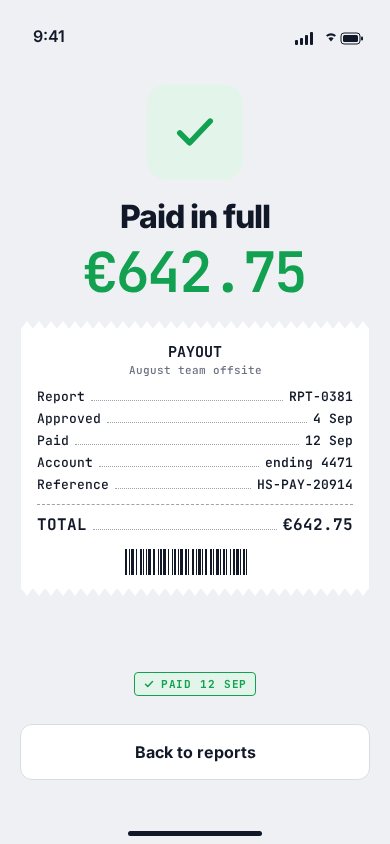
A success screen from Claim, a finance app template in a Minimal style. Screen 18 of 25.
Claim is claim covers expenses end to end: scan a receipt, categorise it, log mileage and per diems, gather everything into a report, submit it and follow the reimbursement from draft to paid. It also has search, spending stats, cards, notifications, a Claim Plus plan, profile and settings.
| Detail | Value |
|---|---|
| Screen type | Success |
| App | Claim: Expenses, filed like a till receipt |
| Category | Finance |
| Design language | Minimal, light |
| Type | Inter |
| Colours | #eef0f3 background, #ffffff surface, #111827 text, #6b7280 text-muted, #2f6bff accent, #ffffff accent-contrast, #12a150 secondary, #d9dde3 border, #d92d20 danger |
What this screen says
- Paid in full
- PAYOUT
- August team offsite
- Report RPT-0381
- Approved 4 Sep
- Paid 12 Sep
- Account ending 4471
- Reference HS-PAY-20914
- TOTAL €642.75
- Back to reports
Around it in Claim
More success and confirmation screens
- Billfold Card added: Cards, passes and tickets wallet
- Payly Payment done: UPI payments, recharges and bills
- Crest Bill paid: Credit card bills and rewards
- Storefront Label ready: Run your online store
- Bastion Transfer sent: Everyday banking from a big bank
- Later Approved: Buy now, pay in four
- Standing Dispute sent: Credit score and reports
- Accrue Transfer started: Retirement and pension planner
- Levy Paid: Taxes for freelancers
- Bullion Purchased: Gold and silver savings
- Wage Cash sent: Get paid as you work
- Keystone Payment scheduled: Mortgage and home loan tracker
Every finance app success screen
What makes a good confirmation screen
- Confirm in the headline. "Payment sent", "Table booked for Friday at 8" or "Lesson complete" in plain words, with a clear success colour or icon.
- Repeat the key details. Amount, date, reference number or score, so people do not need to check elsewhere that the right thing happened.
- Say what happens next. When the order arrives, when the money lands, when the next lesson unlocks.
- Offer the next step. Track the order, add to calendar, share, or start the next lesson. One primary action and a way back home.
The full confirmation screen guide and every example
Remix Claim free: describe your own app and it is drawn in this design. Or get its files from $10: Figma, React Native, SwiftUI, Flutter and HTML.