Templates · Success and confirmation screens · Finance app · Keystone
Keystone Payment scheduled screen
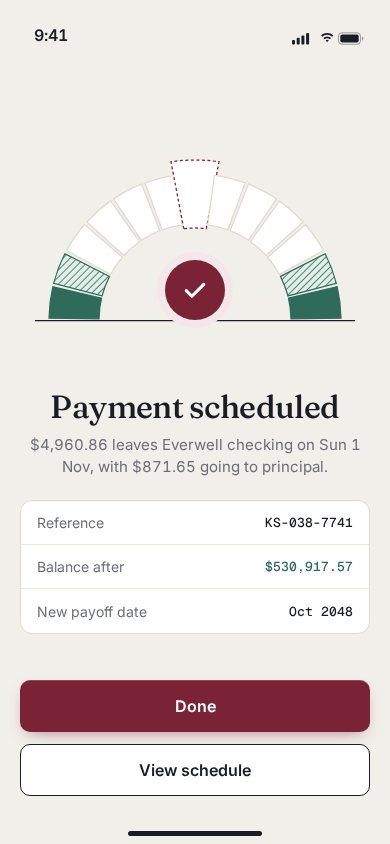
A success screen from Keystone, a mortgage and home loan tracker app template in an Enterprise style. Screen 11 of 25.
Keystone is a complete home loan tracker: welcome, sign in and linking a lender, a home with the equity arch and the next payment, loan details, the full amortization schedule, a payment breakdown and history, making a payment with extra principal, review and confirmation, a payoff planner, refinance offers with a break-even chart, a live rate lock, home value, property, escrow, equity and PMI removal, documents and a statement viewer, a Pro plan, notifications, profile and settings. Limestone and white with oxblood, verdigris and ochre.
| Detail | Value |
|---|---|
| Screen type | Success |
| App | Keystone: Mortgage and home loan tracker |
| Category | Finance |
| Design language | Enterprise, light |
| Type | Fraunces for headings, Inter for text |
| Colours | #f1efe9 background, #ffffff surface, #1a1d24 text, #6c6e76 text-muted, #7a2236 accent, #ffffff accent-contrast, #2e6b5b secondary, #dfdbd1 border, #b4361f danger |
What this screen says
- Payment scheduled
- $4,960.86 leaves Everwell checking on Sun 1 Nov, with $871.65 going to principal.
- Reference KS-038-7741
- Balance after $530,917.57
- New payoff date Oct 2048
- Done
- View schedule
Around it in Keystone
More success and confirmation screens
- Piggy Nice work: Pocket money for kids
- Settle Paid: Bill payments and banking
- Fathom Order complete: Crypto wallet
- Marigold Sent: Mobile banking
- Zentra Swap complete: Crypto trading
- Payday Payroll submitted: Payroll for small teams
- Roundup Invested: Invest your spare change
- Envelope Reconciled: Give every dollar a job
- Recur Cancelled: Track and cancel subscriptions
- Keel Card ready: Corporate cards and spend controls
- Giftly Sent: Gift cards, sent and stored
- Zap Sent: Pay friends with a note
Every finance app success screen
What makes a good confirmation screen
- Confirm in the headline. "Payment sent", "Table booked for Friday at 8" or "Lesson complete" in plain words, with a clear success colour or icon.
- Repeat the key details. Amount, date, reference number or score, so people do not need to check elsewhere that the right thing happened.
- Say what happens next. When the order arrives, when the money lands, when the next lesson unlocks.
- Offer the next step. Track the order, add to calendar, share, or start the next lesson. One primary action and a way back home.
The full confirmation screen guide and every example
Remix Keystone free: describe your own app and it is drawn in this design. Or get its files from $10: Figma, React Native, SwiftUI, Flutter and HTML.