Templates · Success and confirmation screens · Finance app · Standing
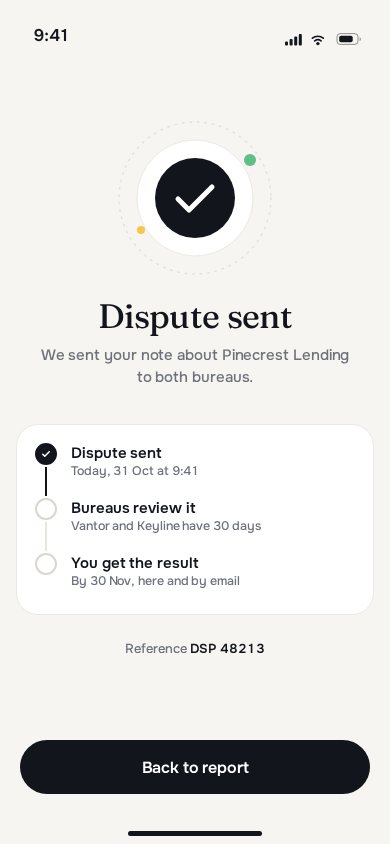
Standing Dispute sent screen
A success screen from Standing, a credit score and reports app template in a Minimal style. Screen 13 of 25.
Standing is a complete credit score app: welcome, sign up and identity check, a home with the score dial and what changed, score history across two bureaus, the six score factors with card use and payment history in depth, the full report with accounts, an account page and enquiries, a dispute with confirmation, alerts with a was this you check, a score simulator, identity monitoring with a breach, matched card and loan offers clearly marked as offers with an application and a sent screen, a Plus plan, profile and settings. Paper and white with ink and a coral to green score scale.
| Detail | Value |
|---|---|
| Screen type | Success |
| App | Standing: Credit score and reports |
| Category | Finance |
| Design language | Minimal, light |
| Type | Fraunces for headings, Onest for text |
| Colours | #f6f5f1 background, #ffffff surface, #12151c text, #6d717b text-muted, #12151c accent, #ffffff accent-contrast, #4a4cf0 secondary, #e7e5de border, #d9442e danger |
What this screen says
- Dispute sent
- We sent your note about Pinecrest Lending to both bureaus.
- Today, 31 Oct at 9:41
- Bureaus review it
- Vantor and Keyline have 30 days
- You get the result
- By 30 Nov, here and by email
- Reference DSP 48213
- Back to report
Around it in Standing
More success and confirmation screens
- Fathom Order complete: Crypto wallet
- Marigold Sent: Mobile banking
- Zentra Swap complete: Crypto trading
- Payday Payroll submitted: Payroll for small teams
- Roundup Invested: Invest your spare change
- Envelope Reconciled: Give every dollar a job
- Recur Cancelled: Track and cancel subscriptions
- Keel Card ready: Corporate cards and spend controls
- Giftly Sent: Gift cards, sent and stored
- Zap Sent: Pay friends with a note
- Billfold Card added: Cards, passes and tickets wallet
- Payly Payment done: UPI payments, recharges and bills
Every finance app success screen
What makes a good confirmation screen
- Confirm in the headline. "Payment sent", "Table booked for Friday at 8" or "Lesson complete" in plain words, with a clear success colour or icon.
- Repeat the key details. Amount, date, reference number or score, so people do not need to check elsewhere that the right thing happened.
- Say what happens next. When the order arrives, when the money lands, when the next lesson unlocks.
- Offer the next step. Track the order, add to calendar, share, or start the next lesson. One primary action and a way back home.
The full confirmation screen guide and every example
Remix Standing free: describe your own app and it is drawn in this design. Or get its files from $10: Figma, React Native, SwiftUI, Flutter and HTML.