Templates · Live tracking screens · Finance app · Claim
Claim Reimbursement screen
A tracking screen from Claim, a finance app template in a Minimal style. Screen 17 of 25.
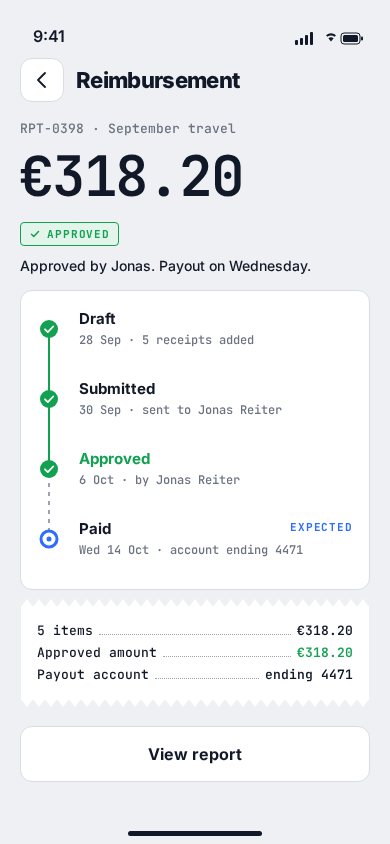
Claim is claim covers expenses end to end: scan a receipt, categorise it, log mileage and per diems, gather everything into a report, submit it and follow the reimbursement from draft to paid. It also has search, spending stats, cards, notifications, a Claim Plus plan, profile and settings.
| Detail | Value |
|---|---|
| Screen type | Tracking |
| App | Claim: Expenses, filed like a till receipt |
| Category | Finance |
| Design language | Minimal, light |
| Type | Inter |
| Colours | #eef0f3 background, #ffffff surface, #111827 text, #6b7280 text-muted, #2f6bff accent, #ffffff accent-contrast, #12a150 secondary, #d9dde3 border, #d92d20 danger |
What this screen says
- Reimbursement
- RPT-0398 · September travel
- Approved
- Approved by Jonas. Payout on Wednesday.
- Draft28 Sep · 5 receipts added
- Submitted30 Sep · sent to Jonas Reiter
- Approved6 Oct · by Jonas Reiter
- PaidExpectedWed 14 Oct · account ending 4471
- 5 items €318.20
- Approved amount €318.20
- Payout account ending 4471
- View report
Around it in Claim
More live tracking screens
- Prism Syncing: Net worth across every account
- Lease Repair: Your tenancy, drawn to plan
- Remit Track transfer: International money transfer
- Recur Negotiation: Track and cancel subscriptions
- Billfold Flight status: Cards, passes and tickets wallet
- Storefront Live view: Run your online store
- Accrue Transfer tracker: Retirement and pension planner
- Levy Mileage: Taxes for freelancers
- Bullion Delivery: Gold and silver savings
- Wage On shift: Get paid as you work
- Keystone Rate lock: Mortgage and home loan tracker
- Rebate Quest: Cashback card and rewards
Every finance app tracking screen
What makes a good live tracking screen
- The live number is the hero. Arrival time, pace, distance or time left, in large type at the top or centre.
- Show status in words. "Driver is 3 minutes away" or "Halfway there" alongside the map or chart.
- Make it readable while moving. Large numbers, high contrast and big buttons for pause, stop or call.
- Keep updates calm. Smooth movement on the map and steady numbers; jumpy updates feel broken.
The full live tracking screen guide and every example
Remix Claim free: describe your own app and it is drawn in this design. Or get its files from $10: Figma, React Native, SwiftUI, Flutter and HTML.