Templates · Success and confirmation screens · Finance app · Accrue
Accrue Transfer started screen
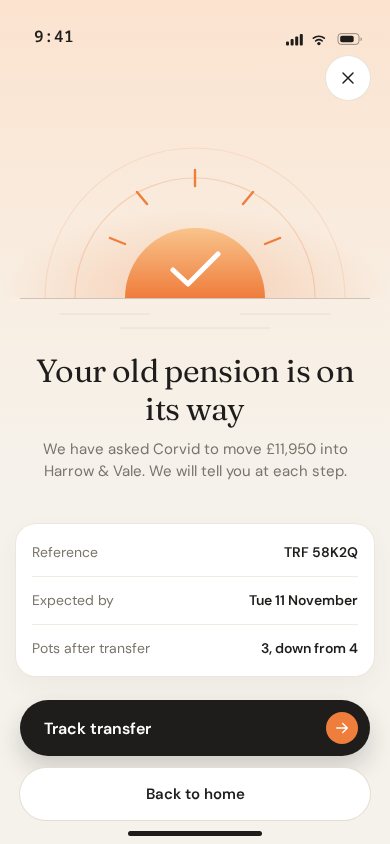
A success screen from Accrue, a retirement and pension planner app template in a Minimal style. Screen 10 of 25.
Accrue is a complete retirement planner: welcome, choosing a retirement age, sign in, a home with a setting sun readiness gauge, a projection fan chart to age 95, pots, a pension in full, finding and transferring an old pension with a live tracker, contributions, what if scenarios, an income plan, the state pension record, funds and a target date fund, lifestyle targets, booking and joining an adviser call, activity, notifications, a Plus plan, profile and settings. Linen and white with ink, apricot and dusk teal.
| Detail | Value |
|---|---|
| Screen type | Success |
| App | Accrue: Retirement and pension planner |
| Category | Finance |
| Design language | Minimal, light |
| Type | Fraunces for headings, DM Sans for text |
| Colours | #f5f2ec background, #ffffff surface, #1e1d1b text, #7a756c text-muted, #ef7d3c accent, #ffffff accent-contrast, #1f5c5e secondary, #e8e3da border, #d0453a danger |
What this screen says
- Your old pension is on its way
- We have asked Corvid to move £11,950 into Harrow & Vale. We will tell you at each step.
- Reference TRF 58K2Q
- Expected by Tue 11 November
- Pots after transfer 3, down from 4
- Track transfer
- Back to home
Around it in Accrue
More success and confirmation screens
- Billable Invoice sent: Time tracking and invoices, kept like a ledger
- Lease Rent paid: Your tenancy, drawn to plan
- Claim Submitted: Expenses, filed like a till receipt
- Tally Expense added: Monthly budgeting
- Divvy Settled: Split bills with friends
- Ticker Order placed: Stock investing
- Burrow Money added: Shared savings pots
- Remit Transfer sent: International money transfer
- Piggy Nice work: Pocket money for kids
- Settle Paid: Bill payments and banking
- Fathom Order complete: Crypto wallet
- Marigold Sent: Mobile banking
Every finance app success screen
What makes a good confirmation screen
- Confirm in the headline. "Payment sent", "Table booked for Friday at 8" or "Lesson complete" in plain words, with a clear success colour or icon.
- Repeat the key details. Amount, date, reference number or score, so people do not need to check elsewhere that the right thing happened.
- Say what happens next. When the order arrives, when the money lands, when the next lesson unlocks.
- Offer the next step. Track the order, add to calendar, share, or start the next lesson. One primary action and a way back home.
The full confirmation screen guide and every example
Remix Accrue free: describe your own app and it is drawn in this design. Or get its files from $10: Figma, React Native, SwiftUI, Flutter and HTML.