Templates · Settings screens · Fitness app · Careline
Careline Settings screen
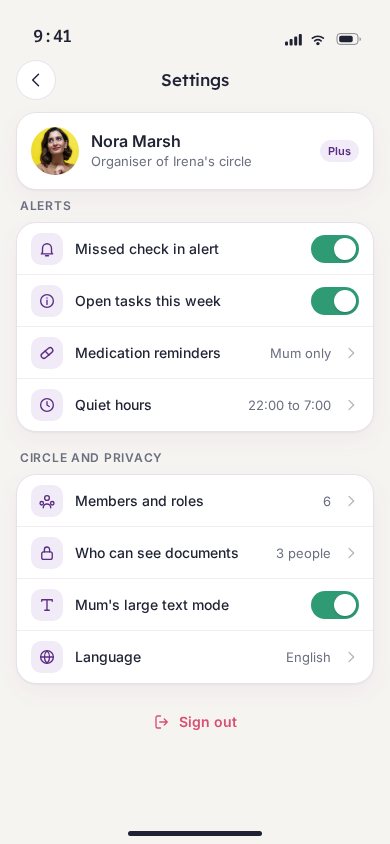
A settings screen from Careline, a care for an ageing parent app template in a Clinical style. Screen 25 of 25.
Careline is a complete family care circle app: welcome, sign in, a today screen with Mum's morning check in, a shared care calendar with open slots, task detail and sign up, new tasks, a medication schedule and refills, appointments with questions to ask, a live ride, an updates journal with comments, a big button check in for the parent, booking a paid home helper with a split cost, a document vault, the family chat, a monthly summary, a plus plan, notifications, the parent's profile with her circle, and settings. Porcelain and white with deep plum, a calm green for covered and a soft rose for help needed.
| Detail | Value |
|---|---|
| Screen type | Settings |
| App | Careline: Care for an ageing parent |
| Category | Health and fitness |
| Design language | Clinical, light |
| Type | Lexend for headings, Inter for text |
| Colours | #f6f4f1 background, #ffffff surface, #1e2233 text, #6b6f80 text-muted, #5a2d82 accent, #f1ebf8 primary-tint, #2e9b74 success, #d94f70 attention, #f2b25c warm-accent, #e7e2ea border |
What this screen says
- Settings
- Nora MarshOrganiser of Irena's circle
- Plus
- Alerts
- Missed check in alert
- Open tasks this week
- Medication reminders
- Mum only
- Quiet hours
- 22:00 to 7:00
- Circle and privacy
- Members and roles
- Who can see documents
- 3 people
- Mum's large text mode
- Language
- English
- Sign out
Around it in Careline
More settings screens
- Rise Settings: Alarm clock and sleep cycles
- Ward Settings: Patient portal for results, visits and messages
- Level Alerts: Glucose monitor companion
- Reformer Settings: Pilates studio booking
- Sip Settings: Water intake and hydration
- Mend Settings: Physio and rehab exercises
- Tabata Settings: HIIT interval timer
- Jab Settings: Boxing workouts with a smart bag
- Exhale Settings: Breathwork sessions
- Bump Settings: Pregnancy week by week
- Locker Settings: Gym membership and class booking
- Morsel Reminders: AI calorie tracker
Every fitness app settings screen
What makes a good settings screen
- Group options into clear sections. Account, notifications, privacy, appearance and help, with headings, so people scan to the right group.
- Label settings by their effect. "Daily reminder at 8:00" is clearer than "Reminders". Add a short description under options that need one.
- Use the right control. Toggles for on and off, a row that opens a list for choices, and sliders only for ranges.
- Apply changes immediately. Most mobile settings take effect when changed, with no Save button to forget.
The full settings screen guide and every example
Remix Careline free: describe your own app and it is drawn in this design. Or get its files from $10: Figma, React Native, SwiftUI, Flutter and HTML.