Templates · Settings screens · Social app · Candid
Candid Settings screen
A settings screen from Candid, an one real photo a day app template in a Gen Z style. Screen 25 of 25.
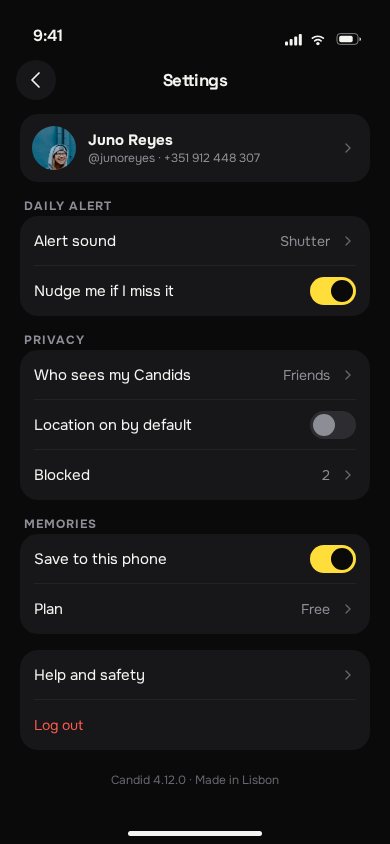
Candid is a complete daily photo app for close friends: welcome, how it works, phone sign in and code, finding friends, a locked feed, the two minute prompt, a dual camera with review and a posted screen, the unlocked friends feed, a post with comments, selfie reactions and a reaction camera, discovery, friends and requests, a friend's profile, a memories calendar, a single memory, a monthly recap, Candid Plus, notifications, your profile and settings. Near black with flash yellow and lilac.
| Detail | Value |
|---|---|
| Screen type | Settings |
| App | Candid: One real photo a day |
| Category | Social |
| Design language | Gen Z, dark |
| Type | Space Grotesk for headings, Onest for text |
| Colours | #0a0a0b background, #17171a surface, #f4f4f0 text, #8d8d95 text-muted, #ffde3b accent, #0a0a0b accent-contrast, #c3a8ff secondary, #26262b border, #ff5a4e danger |
What this screen says
- Settings
- Juno Reyes@junoreyes · +351 912 448 307
- DAILY ALERT
- Alert sound
- Shutter
- Nudge me if I miss it
- PRIVACY
- Who sees my Candids
- Friends
- Location on by default
- Blocked
- MEMORIES
- Save to this phone
- Plan
- Free
- Help and safety
- Log out
- Candid 4.12.0 · Made in Lisbon
Around it in Candid
More settings screens
- Snoot Settings: Social app for pets
- Huddle Settings: Interest groups and meetups
- Glade Settings: Photo and clip social network
- Onair Settings: Live streaming
- Drift Settings: Reels and voice rooms
- Glitz Settings: Party live streaming
- Hearth Privacy: Messenger for trips and circles
- Chirp Settings: Messenger with file sharing
- Banter Privacy: Live messenger
- Natter Settings: Minimal messenger
- Nearly Settings: Dating by crossed paths
- Linkup Settings: Professional network and jobs
Every social app settings screen
What makes a good settings screen
- Group options into clear sections. Account, notifications, privacy, appearance and help, with headings, so people scan to the right group.
- Label settings by their effect. "Daily reminder at 8:00" is clearer than "Reminders". Add a short description under options that need one.
- Use the right control. Toggles for on and off, a row that opens a list for choices, and sliders only for ranges.
- Apply changes immediately. Most mobile settings take effect when changed, with no Save button to forget.
The full settings screen guide and every example
Remix Candid free: describe your own app and it is drawn in this design. Or get its files from $10: Figma, React Native, SwiftUI, Flutter and HTML.