Templates · Settings screens · Social app · Hearth
Hearth Privacy screen
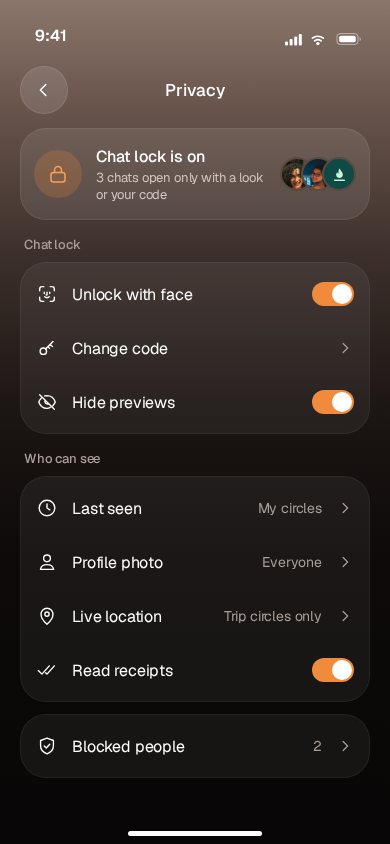
A settings screen from Hearth, a messenger for trips and circles app template in a Glass style. Screen 24 of 25.
Hearth is a complete messenger built around close circles and the trips they plan: onboarding, phone sign in and a code, chats with story tiles and filters, group chats with shared photo stacks, reactions and a pinned plan, a trip plan with a day by day timeline, polls, live location on a map, a shared album, calls and a group video call, updates and stories, contact profiles with stats and media, insights, a plus plan, chat lock, privacy and settings. Warm dusk brown melting into black, frosted glass and ember orange.
| Detail | Value |
|---|---|
| Screen type | Settings |
| App | Hearth: Messenger for trips and circles |
| Category | Social |
| Design language | Glass, dark |
| Type | Geist |
| Colours | #0d0a09 background, #2a221f surface, #ffffff text, #a99e98 text-muted, #f08a3c accent, #1c0f06 accent-contrast, #e9cba8 secondary, #3a302c border, #f0453f danger |
What this screen says
- Privacy
- Chat lock is on
- 3 chats open only with a look or your code
- Chat lock
- Unlock with face
- Change code
- Hide previews
- Who can see
- Last seen My circles
- Profile photo Everyone
- Live location Trip circles only
- Read receipts
- Blocked people 2
Around it in Hearth
More settings screens
- Guild Settings: Community servers with voice and text chat
- Parrot Settings: Private messaging, groups and calls
- Carrier Settings: Cloud messaging with channels
- Vista Settings: Photos, stories and reels
- Flick Settings: Short video feed
- Squawk Settings: Short posts and live conversation
- Agora Settings: Communities, threads and votes
- Spark Settings: Swipe dating
- Candid Settings: One real photo a day
- Blink Settings: Camera chat and stories
- Cipher Privacy: Encrypted private messenger
- Commons Settings: Friends, groups and events
Every social app settings screen
What makes a good settings screen
- Group options into clear sections. Account, notifications, privacy, appearance and help, with headings, so people scan to the right group.
- Label settings by their effect. "Daily reminder at 8:00" is clearer than "Reminders". Add a short description under options that need one.
- Use the right control. Toggles for on and off, a row that opens a list for choices, and sliders only for ranges.
- Apply changes immediately. Most mobile settings take effect when changed, with no Save button to forget.
The full settings screen guide and every example
Remix Hearth free: describe your own app and it is drawn in this design. Or get its files from $10: Figma, React Native, SwiftUI, Flutter and HTML.