Templates · Live tracking screens · Productivity app · Branch
Branch Live session screen
A tracking screen from Branch, a mind maps app template in a Playful style. Screen 17 of 25.
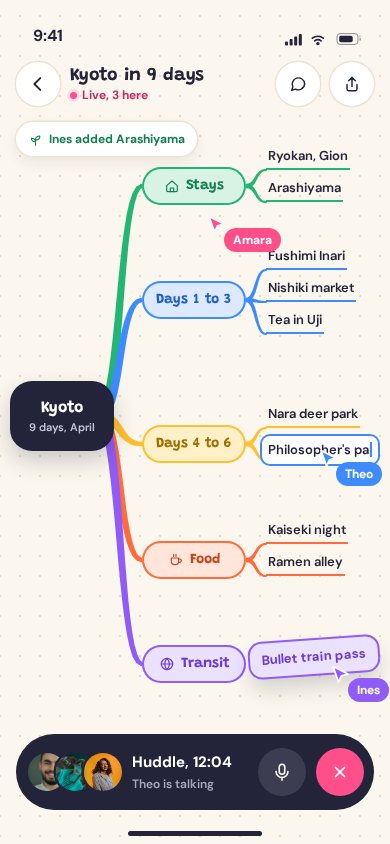
Branch is a complete mind mapping app: welcome, a pick your first map step, sign in, a home with the map you are growing and a daily seed prompt, a library of maps, search across ideas and notes, a full canvas editor, an idea with photos, notes and a checklist, adding a branch, map style, an outline view, a timed idea sprint, AI sprouts, templates and a template preview, sharing, a live session with cursors and a huddle, comments, export to a PDF poster and its success screen, insights, a Plus plan, notifications, profile and settings. Warm paper and ink with six bright branch colours.
| Detail | Value |
|---|---|
| Screen type | Tracking |
| App | Branch: Mind maps |
| Category | Productivity |
| Design language | Playful, light |
| Type | Grandstander for headings, DM Sans for text |
| Colours | #fbf7ee background, #ffffff surface, #23233a text, #85809a text-muted, #ff6b3d accent, #ffffff accent-contrast, #22b573 secondary, #ece4d3 border, #ff4f8b danger |
What this screen says
- Kyoto in 9 daysLive, 3 here
- Stays
- Ryokan, Gion
- Arashiyama
- Days 1 to 3
- Fushimi Inari
- Nishiki market
- Tea in Uji
- Days 4 to 6
- Nara deer park
- Food
- Kaiseki night
- Ramen alley
- Transit
- Kyoto9 days, April
- Philosopher's pa
- Ines added Arashiyama
- Bullet train pass
- Theo
- Ines
- Amara
- Huddle, 12:04Theo is talking
Around it in Branch
More live tracking screens
- Unplug Session: Screen time blocker
- Deskly Floor plan: Hybrid office booking
- Pomo Focus: Focus timer
- Rota Clock in: Shift scheduling for hourly teams
- Shortlist Application: Job search and application tracker
- Docket Focus: Task and sprint planner
- Margin Record: AI note taking
- Aide Focus: Executive AI assistant
- Opal Timer: Studio dashboard
- Chrono Ringing: World clock, timers and stopwatch
- Pageview Realtime: Website analytics
- Tapline Live: Link-in-bio pages and analytics
Every productivity app tracking screen
What makes a good live tracking screen
- The live number is the hero. Arrival time, pace, distance or time left, in large type at the top or centre.
- Show status in words. "Driver is 3 minutes away" or "Halfway there" alongside the map or chart.
- Make it readable while moving. Large numbers, high contrast and big buttons for pause, stop or call.
- Keep updates calm. Smooth movement on the map and steady numbers; jumpy updates feel broken.
The full live tracking screen guide and every example
Remix Branch free: describe your own app and it is drawn in this design. Or get its files from $10: Figma, React Native, SwiftUI, Flutter and HTML.