Templates · Live tracking screens · Productivity app · Rota
Rota Clock in screen
A tracking screen from Rota, a shift scheduling for hourly teams app template in an Enterprise style. Screen 9 of 25.
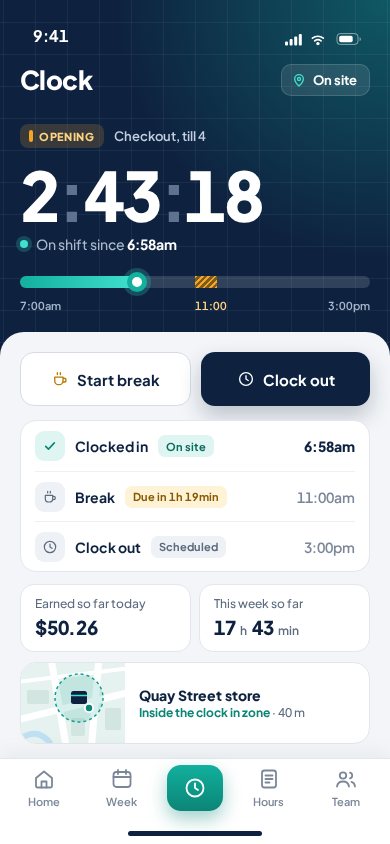
Rota is a complete workforce app for people paid by the hour: welcome, sign in, joining a team with a code, a home with the live shift, the week as colour coded shift blocks, shift detail, clocking in on site with breaks and a shift summary, open shifts, swap requests, availability and time off, a timesheet table with entry fixes, a pay estimate and payslip, the team rota, teammates, notifications, profile and settings. Opening, mid and close shifts keep their own colour on every screen.
| Detail | Value |
|---|---|
| Screen type | Tracking |
| App | Rota: Shift scheduling for hourly teams |
| Category | Productivity |
| Design language | Enterprise, light |
| Type | Plus Jakarta Sans |
| Colours | #f3f5f8 background, #ffffff surface, #0e2240 text, #5d6b7e text-muted, #0b8577 accent, #ffffff accent-contrast, #f5a524 secondary, #e2e7ee border, #d9453c danger |
What this screen says
- Clock
- On site
- OpeningCheckout, till 4
- On shift since 6:58am
- 7:00am 11:00 3:00pm
- Start break
- Clock out
- Clocked inOn site6:58am
- BreakDue in 1h 19min11:00am
- Clock outScheduled3:00pm
- Earned so far today $50.26
- This week so far 17h 43min
- Quay Street store
- Inside the clock in zone · 40 m
- Home
- Week
- Hours
- Team
Around it in Rota
More live tracking screens
- Stow Uploads: Cloud storage
- Bench Contract: Freelance marketplace
- Unplug Session: Screen time blocker
- Deskly Floor plan: Hybrid office booking
- Pomo Focus: Focus timer
- Shortlist Application: Job search and application tracker
- Docket Focus: Task and sprint planner
- Margin Record: AI note taking
- Aide Focus: Executive AI assistant
- Opal Timer: Studio dashboard
- Chrono Ringing: World clock, timers and stopwatch
- Pageview Realtime: Website analytics
Every productivity app tracking screen
What makes a good live tracking screen
- The live number is the hero. Arrival time, pace, distance or time left, in large type at the top or centre.
- Show status in words. "Driver is 3 minutes away" or "Halfway there" alongside the map or chart.
- Make it readable while moving. Large numbers, high contrast and big buttons for pause, stop or call.
- Keep updates calm. Smooth movement on the map and steady numbers; jumpy updates feel broken.
The full live tracking screen guide and every example
Remix Rota free: describe your own app and it is drawn in this design. Or get its files from $10: Figma, React Native, SwiftUI, Flutter and HTML.