Templates · Live tracking screens · Productivity app · Unplug
Unplug Session screen
A tracking screen from Unplug, a screen time blocker app template in a Glass style. Screen 10 of 25.
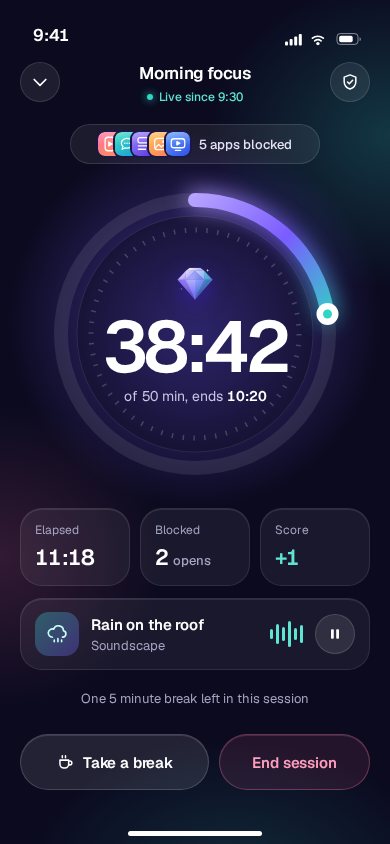
Unplug is a complete screen time app: an onboarding that projects your year on the phone, screen time access, choosing apps to block, a paywall, a home with the focus score, today's screen time by hour and the live session, a ring timer, the calm blocked screen, breaks, schedules, app limits, daily and weekly reports, insights, streaks, milestones and friends. Midnight indigo with aurora glows, frosted glass and a faceted gem that changes colour as the score climbs.
| Detail | Value |
|---|---|
| Screen type | Tracking |
| App | Unplug: Screen time blocker |
| Category | Productivity |
| Design language | Glass, dark |
| Type | Geist |
| Colours | #0b0a1f background, #1a1836 surface, #ffffff text, #a5a3c2 text-muted, #7a5cff accent, #ffffff accent-contrast, #2fd6c3 secondary, #2b2850 border, #ff6f9c danger |
What this screen says
- Morning focus
- Live since 9:30
- 5 apps blocked
- of 50 min, ends 10:20
- Elapsed
- Blocked
- 2 opens
- Score
- Rain on the roof
- Soundscape
- One 5 minute break left in this session
- Take a break
- End session
Around it in Unplug
More live tracking screens
- Lectern Rehearse: Slides and presenter remote
- Ringer In call: Phone, contacts and voicemail
- Pipeline Route: Sales CRM on the road
- Aim Focus: Goals and key results
- Scribe Transcribing: Voice memos to notes
- Inkline Live status: Sign and send contracts
- Dispatch Route: Field service jobs for technicians
- Uptime Regions: Server and site monitoring
- Branch Brainstorm: Mind maps
- Stow Uploads: Cloud storage
- Bench Contract: Freelance marketplace
- Deskly Floor plan: Hybrid office booking
Every productivity app tracking screen
What makes a good live tracking screen
- The live number is the hero. Arrival time, pace, distance or time left, in large type at the top or centre.
- Show status in words. "Driver is 3 minutes away" or "Halfway there" alongside the map or chart.
- Make it readable while moving. Large numbers, high contrast and big buttons for pause, stop or call.
- Keep updates calm. Smooth movement on the map and steady numbers; jumpy updates feel broken.
The full live tracking screen guide and every example
Remix Unplug free: describe your own app and it is drawn in this design. Or get its files from $10: Figma, React Native, SwiftUI, Flutter and HTML.