Templates · Live tracking screens · Productivity app · Shortlist
Shortlist Application screen
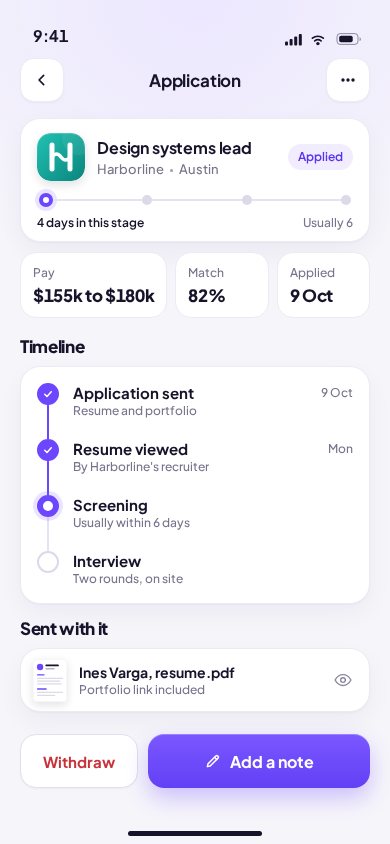
A tracking screen from Shortlist, a job search and application tracker app template in an Enterprise style. Screen 17 of 25.
Shortlist is a complete job search app: welcome, sign in, a code and job preferences, a home with today's interview, the pipeline and top matches, search with filters and saved searches, a job page with a match breakdown, the company, a two step application with review and a sent confirmation, a tracker board, one application's timeline, the interview, prep questions with a practice timer, salary insights with a pay distribution, an offer breakdown, a Plus plan, notifications, profile and settings. Every company has its own drawn monogram and every role shows how well it matches.
| Detail | Value |
|---|---|
| Screen type | Tracking |
| App | Shortlist: Job search and application tracker |
| Category | Productivity |
| Design language | Enterprise, light |
| Type | Plus Jakarta Sans |
| Colours | #f6f5fa background, #ffffff surface, #17132b text, #77738c text-muted, #6c47ff accent, #ffffff accent-contrast, #12a56b secondary, #eceaf4 border, #e5484d danger |
What this screen says
- Application
- Design systems lead
- HarborlineAustin
- Applied
- 4 days in this stageUsually 6
- Pay $155k to $180k
- Match 82%
- Applied 9 Oct
- Timeline
- Application sent
- Resume and portfolio 9 Oct
- Resume viewed
- By Harborline's recruiter Mon
- Screening
- Usually within 6 days
- Interview
- Two rounds, on site
- Sent with it
- Ines Varga, resume.pdf
- Portfolio link included
- Withdraw
- Add a note
Around it in Shortlist
More live tracking screens
- Beam Uploading: Send big files
- Lectern Rehearse: Slides and presenter remote
- Ringer In call: Phone, contacts and voicemail
- Pipeline Route: Sales CRM on the road
- Aim Focus: Goals and key results
- Scribe Transcribing: Voice memos to notes
- Inkline Live status: Sign and send contracts
- Dispatch Route: Field service jobs for technicians
- Uptime Regions: Server and site monitoring
- Branch Brainstorm: Mind maps
- Stow Uploads: Cloud storage
- Bench Contract: Freelance marketplace
Every productivity app tracking screen
What makes a good live tracking screen
- The live number is the hero. Arrival time, pace, distance or time left, in large type at the top or centre.
- Show status in words. "Driver is 3 minutes away" or "Halfway there" alongside the map or chart.
- Make it readable while moving. Large numbers, high contrast and big buttons for pause, stop or call.
- Keep updates calm. Smooth movement on the map and steady numbers; jumpy updates feel broken.
The full live tracking screen guide and every example
Remix Shortlist free: describe your own app and it is drawn in this design. Or get its files from $10: Figma, React Native, SwiftUI, Flutter and HTML.