Templates · List and feed screens · Productivity app · Branch
Branch Comments screen
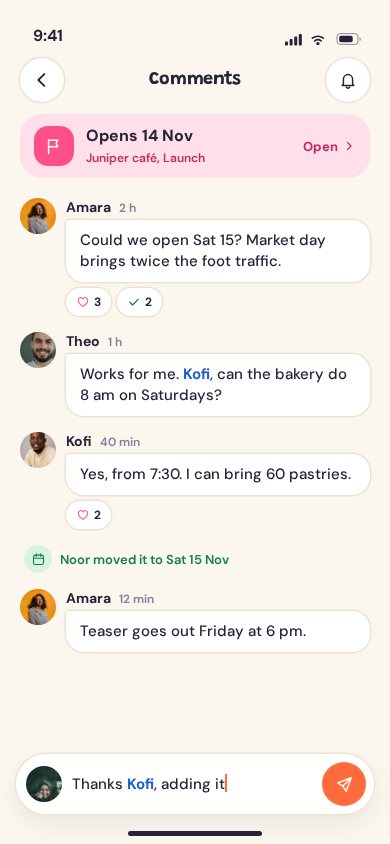
A list screen from Branch, a mind maps app template in a Playful style. Screen 18 of 25.
Branch is a complete mind mapping app: welcome, a pick your first map step, sign in, a home with the map you are growing and a daily seed prompt, a library of maps, search across ideas and notes, a full canvas editor, an idea with photos, notes and a checklist, adding a branch, map style, an outline view, a timed idea sprint, AI sprouts, templates and a template preview, sharing, a live session with cursors and a huddle, comments, export to a PDF poster and its success screen, insights, a Plus plan, notifications, profile and settings. Warm paper and ink with six bright branch colours.
| Detail | Value |
|---|---|
| Screen type | List |
| App | Branch: Mind maps |
| Category | Productivity |
| Design language | Playful, light |
| Type | Grandstander for headings, DM Sans for text |
| Colours | #fbf7ee background, #ffffff surface, #23233a text, #85809a text-muted, #ff6b3d accent, #ffffff accent-contrast, #22b573 secondary, #ece4d3 border, #ff4f8b danger |
What this screen says
- Comments
- Opens 14 NovJuniper café, Launch
- Open
- Amara2 h
- Could we open Sat 15? Market day brings twice the foot traffic.
- Theo1 h
- Works for me. Kofi, can the bakery do 8 am on Saturdays?
- Kofi40 min
- Yes, from 7:30. I can bring 60 pastries.
- Noor moved it to Sat 15 Nov
- Amara12 min
- Teaser goes out Friday at 6 pm.
- Thanks Kofi, adding it
Around it in Branch
More list and feed screens
- Slot Calendar: Booking links and meeting scheduling
- Sheet Base: Spreadsheets and databases
- Tunnel Specialty servers: VPN and online privacy
- Ping History: Internet speed test
- Glance History: Visual search with the camera
- Replay Library: Record and share screen videos
- Easel Templates: Collaborative whiteboard
- Token Requests: Two-factor codes and sign-in approvals
- Beam Transfers: Send big files
- Parchment Files: Documents, edit and share
- Lectern New deck: Slides and presenter remote
- Ringer Recents: Phone, contacts and voicemail
Every productivity app list screen
What makes a good list screen
- Show what people need to decide. Each row should carry just enough to choose: a title, one or two details and a status. Everything else belongs on the detail screen.
- Keep rows consistent. The same information in the same place on every row lets people scan down a column instead of reading each item.
- Group with headings. Dates, categories or status headings break long lists into chunks people can skip through.
- Make common actions quick. Swipe actions, a checkbox or a heart on the row save opening the item for small tasks.
The full list screen guide and every example
Remix Branch free: describe your own app and it is drawn in this design. Or get its files from $10: Figma, React Native, SwiftUI, Flutter and HTML.