Templates · Form and input screens · Smart home app · Boxed
Boxed Pick a van screen
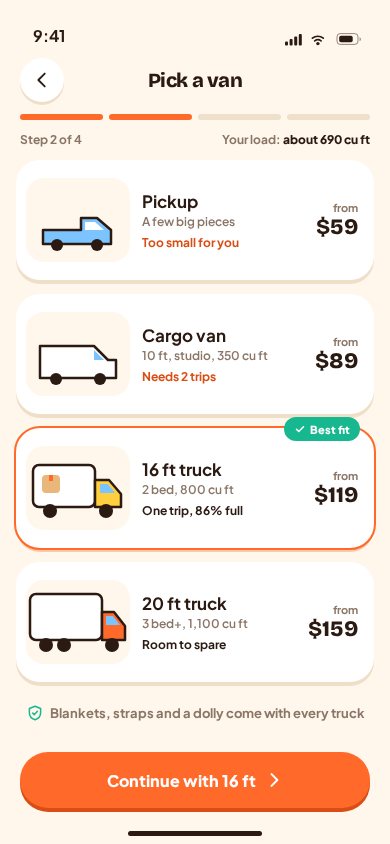
A form screen from Boxed, a smart home app template in a Playful style. Screen 8 of 25.
Boxed is a complete moving app: welcome, sign in with a texted code, a home with the move day countdown, crew and checklist, move details with both addresses, an inventory by room with a truck fill meter, a room with item steppers and box counts, add item, pick a van, pick a crew, a mover profile, a fixed price quote, a calendar with daily prices, review and pay, a booked ticket, a countdown checklist, packing progress, live move tracking on a map, chat with the crew, a supplies shop and box kit, rate and tip the crew, a Plus cover plan, notifications, profile and settings. Cream and kraft with tomato orange, sunny yellow and mint.
| Detail | Value |
|---|---|
| Screen type | Form |
| App | Boxed: Book movers and plan moving day |
| Category | Smart home |
| Design language | Playful, light |
| Type | Bricolage Grotesque for headings, Plus Jakarta Sans for text |
| Colours | #fff7ec background, #ffffff surface, #2b1a12 text, #8a7566 text-muted, #ff6a2b accent, #ffffff accent-contrast, #e9b77a secondary, #f0dfc8 border, #e0452a danger |
What this screen says
- Pick a van
- Step 2 of 4 Your load: about 690 cu ft
- PickupA few big pieces Too small for you
- from$59
- Cargo van10 ft, studio, 350 cu ft Needs 2 trips
- from$89
- Best fit
- 16 ft truck2 bed, 800 cu ft One trip, 86% full
- from$119
- 20 ft truck3 bed+, 1,100 cu ft Room to spare
- from$159
- Blankets, straps and a dolly come with every truck
- Continue with 16 ft
Around it in Boxed
More form and input screens
- Lumen Add device: Smart home energy
- Abode Set a time: Smart home devices
- Meter Confirm reading: Your energy supplier account
- Couch Keyboard: TV remote, casting and watchlist
- Chime New routine: Voice assistant and smart speaker
- Latch New key: Smart locks and guest access
- Mesh Schedule: Home Wi-Fi network
- Decibel Group rooms: Multi-room speakers
- Nursery Log sleep: Baby monitor camera and sleep
- Porch Motion zones: Home security cameras
- Sundial Battery mode: Solar panels and home battery
- Puddle Edit schedule: Garden watering and sprinklers
Every smart home app form screen
What makes a good form screen
- Ask only what you need. Every field is a reason to stop. Remove optional fields or move them to later.
- Labels above fields. Visible labels stay readable while people type; placeholder-only labels disappear.
- Use the right keyboard and input. Number pads for amounts, email keyboards for email, pickers for dates and autofill for addresses and codes.
- Validate as people go. Show problems next to the field when people leave it, in words that say how to fix them.
The full form screen guide and every example
Remix Boxed free: describe your own app and it is drawn in this design. Or get its files from $10: Figma, React Native, SwiftUI, Flutter and HTML.