Templates · Live tracking screens · Productivity app · Beam
Beam Uploading screen
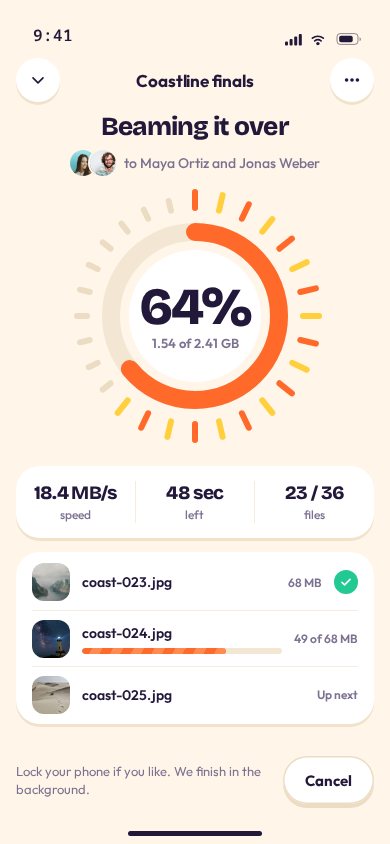
A tracking screen from Beam, a send big files app template in a Playful style. Screen 8 of 25.
Beam is a complete big file sending app: welcome, sign in and a code, a home with a drop zone and recent transfers, picking photos and files, a new transfer by email or link with a message, expiry and password options, a live upload, sent and link ready screens, sent transfers with download counts, a transfer with who downloaded what, stats, received transfers, the receiver's download page, a photo preview, a password lock, search, file requests, notifications, a Plus plan with checkout, a branded download page, profile and settings. Warm cream with tangerine, sun yellow and grape ink.
| Detail | Value |
|---|---|
| Screen type | Tracking |
| App | Beam: Send big files |
| Category | Productivity |
| Design language | Playful, light |
| Type | Bricolage Grotesque for headings, Outfit for text |
| Colours | #fff6e9 background, #ffffff surface, #22183a text, #7b7191 text-muted, #ff6a2b accent, #ffffff accent-contrast, #ffcf3d secondary, #f1e2cc border, #ef4b5f danger |
What this screen says
- Coastline finals
- Beaming it over
- to Maya Ortiz and Jonas Weber
- 64%1.54 of 2.41 GB
- 18.4 MB/sspeed
- 48 secleft
- 23 / 36files
- coast-023.jpg
- 68 MB
- coast-024.jpg
- 49 of 68 MB
- coast-025.jpg
- Up next
- Lock your phone if you like. We finish in the background.
- Cancel
Around it in Beam
More live tracking screens
- Aim Focus: Goals and key results
- Scribe Transcribing: Voice memos to notes
- Inkline Live status: Sign and send contracts
- Dispatch Route: Field service jobs for technicians
- Uptime Regions: Server and site monitoring
- Branch Brainstorm: Mind maps
- Stow Uploads: Cloud storage
- Bench Contract: Freelance marketplace
- Unplug Session: Screen time blocker
- Deskly Floor plan: Hybrid office booking
- Pomo Focus: Focus timer
- Rota Clock in: Shift scheduling for hourly teams
Every productivity app tracking screen
What makes a good live tracking screen
- The live number is the hero. Arrival time, pace, distance or time left, in large type at the top or centre.
- Show status in words. "Driver is 3 minutes away" or "Halfway there" alongside the map or chart.
- Make it readable while moving. Large numbers, high contrast and big buttons for pause, stop or call.
- Keep updates calm. Smooth movement on the map and steady numbers; jumpy updates feel broken.
The full live tracking screen guide and every example
Remix Beam free: describe your own app and it is drawn in this design. Or get its files from $10: Figma, React Native, SwiftUI, Flutter and HTML.