Templates · Live tracking screens · Productivity app · Bench
Bench Contract screen
A tracking screen from Bench, a freelance marketplace app template in an Enterprise style. Screen 19 of 25.
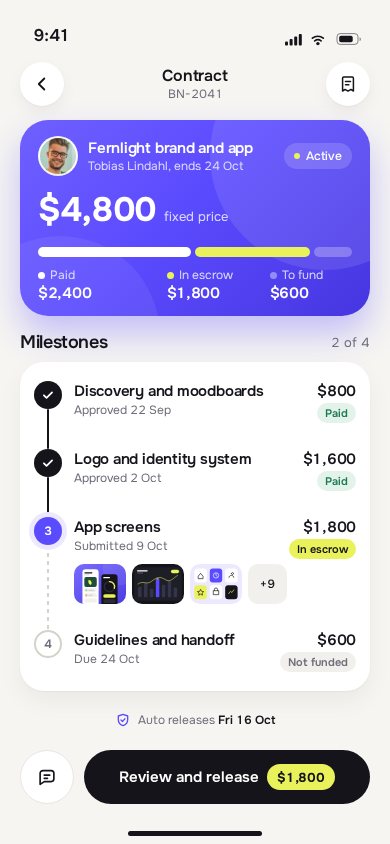
Bench is a complete freelance marketplace for clients: onboarding, role choice and sign in, a home with the contract that needs attention and top rated talent, categories, search with filters, a freelancer profile with portfolio, packages and reviews, posting a job with budget and timeline, proposals ranked by match score, messages and chat, sending an offer, a contract with a milestone timeline and escrow, milestone review, funding escrow, payments, leaving a review, profile and settings. Off white and white with ink, violet and lemon.
| Detail | Value |
|---|---|
| Screen type | Tracking |
| App | Bench: Freelance marketplace |
| Category | Productivity |
| Design language | Enterprise, light |
| Type | Onest |
| Colours | #f6f5f2 background, #ffffff surface, #14141a text, #6e6e7a text-muted, #5b4bff accent, #ffffff accent-contrast, #e9f25b secondary, #e8e6e0 border, #d9453d danger |
What this screen says
- ContractBN-2041
- Fernlight brand and appTobias Lindahl, ends 24 Oct
- Active
- $4,800fixed price
- Paid $2,400
- In escrow $1,800
- To fund $600
- Milestones2 of 4
- Discovery and moodboardsApproved 22 Sep
- $800Paid
- Logo and identity systemApproved 2 Oct
- $1,600Paid
- App screensSubmitted 9 Oct
- $1,800In escrow
- Guidelines and handoffDue 24 Oct
- $600Not funded
- Auto releases Fri 16 Oct
- Review and release$1,800
Around it in Bench
More live tracking screens
- Aide Focus: Executive AI assistant
- Opal Timer: Studio dashboard
- Chrono Ringing: World clock, timers and stopwatch
- Pageview Realtime: Website analytics
- Tapline Live: Link-in-bio pages and analytics
- Canvas Mirror: Design files and comments on mobile
- Merge Checks: Code, pull requests and reviews
- Query Searching: AI answers with sources
- Beacon Find nearby: Find your devices and people
- Tunnel Connecting: VPN and online privacy
- Ping Testing: Internet speed test
- Easel Voting: Collaborative whiteboard
Every productivity app tracking screen
What makes a good live tracking screen
- The live number is the hero. Arrival time, pace, distance or time left, in large type at the top or centre.
- Show status in words. "Driver is 3 minutes away" or "Halfway there" alongside the map or chart.
- Make it readable while moving. Large numbers, high contrast and big buttons for pause, stop or call.
- Keep updates calm. Smooth movement on the map and steady numbers; jumpy updates feel broken.
The full live tracking screen guide and every example
Remix Bench free: describe your own app and it is drawn in this design. Or get its files from $10: Figma, React Native, SwiftUI, Flutter and HTML.