Templates · Settings screens · Social app · Ballot
Ballot Poll rules screen
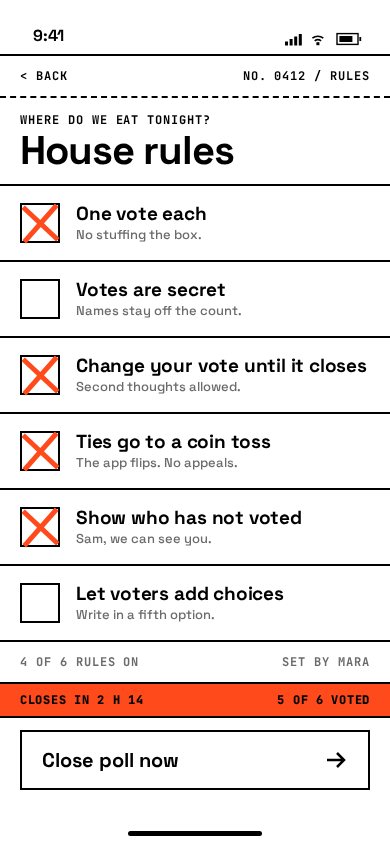
A settings screen from Ballot, a settle it on paper app template in a Brutalist style. Screen 25 of 25.
Ballot is ballot settles where to eat and when to meet. It covers making a poll with options and a closing time, inviting voters, marking one box or ranking choices, live results with huge percentages, ranked count rounds, groups, an archive of closed polls, stats, notifications and a Ballot Plus plan.
| Detail | Value |
|---|---|
| Screen type | Settings |
| App | Ballot: Settle it on paper |
| Category | Social |
| Design language | Brutalist, light |
| Type | Space Grotesk |
| Colours | #ffffff background, #ffffff surface, #000000 text, #6b6b6b text-muted, #ff4a1c accent, #000000 accent-contrast, #000000 border |
What this screen says
- < BACK NO. 0412 / RULES
- WHERE DO WE EAT TONIGHT?
- House rules
- One vote eachNo stuffing the box.
- Votes are secretNames stay off the count.
- Change your vote until it closesSecond thoughts allowed.
- Ties go to a coin tossThe app flips. No appeals.
- Show who has not votedSam, we can see you.
- Let voters add choicesWrite in a fifth option.
- 4 OF 6 RULES ON SET BY MARA
- CLOSES IN 2 H 14 5 OF 6 VOTED
- Close poll now
Around it in Ballot
More settings screens
- Parrot Settings: Private messaging, groups and calls
- Carrier Settings: Cloud messaging with channels
- Vista Settings: Photos, stories and reels
- Flick Settings: Short video feed
- Squawk Settings: Short posts and live conversation
- Agora Settings: Communities, threads and votes
- Spark Settings: Swipe dating
- Candid Settings: One real photo a day
- Blink Settings: Camera chat and stories
- Cipher Privacy: Encrypted private messenger
- Commons Settings: Friends, groups and events
- Tether Settings: Family location and safety
Every social app settings screen
What makes a good settings screen
- Group options into clear sections. Account, notifications, privacy, appearance and help, with headings, so people scan to the right group.
- Label settings by their effect. "Daily reminder at 8:00" is clearer than "Reminders". Add a short description under options that need one.
- Use the right control. Toggles for on and off, a row that opens a list for choices, and sliders only for ranges.
- Apply changes immediately. Most mobile settings take effect when changed, with no Save button to forget.
The full settings screen guide and every example
Remix Ballot free: describe your own app and it is drawn in this design. Or get its files from $10: Figma, React Native, SwiftUI, Flutter and HTML.